Turn the diagnosis into a customer-ready repair plan.

Bring ARIA the symptom on your next problem car. She can choose the readings, watch for relevant changes and schedule follow-ups while you work through the evidence. Reopen the recorded drive and keep the findings with your Pro reporting tools.

Manufacturer-specific data
ARIA goes past the engine computer into modules like body control, brakes, airbags, power steering, parking aid, trailer brake, transfer case, climate, seats and EV battery. Available modules and readings vary by vehicle and adapter type.
Full OBD-II diagnostics — J1979-1 & J1979-2
Codes, live data, freeze frame, Mode 6 and emissions readiness—including OBDonUDS through GEN2.
AI-driven triggers
“Check again when the engine warms up.” ARIA wakes when the condition is met and reviews the evidence.
AI-driven watches & check-ins
Have ARIA follow important readings and check back as your test progresses. Run up to five active watches and scheduled check-ins together.
Repair estimates & shop-branded reports
Turn findings into parts-and-labor estimates, diagnostic reports, emissions pre-checks and pre-purchase reports under your shop’s logo.
Factory-information research
Ask ARIA for pinouts, circuit tests, specifications and diagnostic procedures. She researches the sources and returns a cited answer. Three research jobs per month.
$24.92/moFirst-year monthly equivalent · annual plan$299 billed annuallyIncludes a GEN2 scanner and 12 months of Pro.Then $265/year on renewal, service only.
Cancel renewal anytime.
Shipping and tax, if applicable, appear at checkout.

Find the next test before buying the next part.

Tell ARIA what the car is doing. She can choose available readings, set a timed follow-up and watch for the change that matters, so you can follow a diagnostic plan without building one yourself.

ARIA-led diagnosis
Tell ARIA the symptom by voice, text or photo. She chooses the readings and works through the evidence to guide your next test.
Full OBD-II diagnostics — J1979-1
Codes, live data, freeze frame, Mode 6 and emissions readiness, with ARIA there to explain what the results mean.
AI-driven triggers
“Check again when the engine warms up.” ARIA wakes when the condition is met and reviews the evidence.
AI-driven watches & check-ins
Have ARIA follow important readings and check back as your test progresses. Run up to two active watches and scheduled check-ins together.
Second-by-second road-test replay
Review the drive second by second so an intermittent problem has evidence behind it.
Vehicle memory & PDF reports
Pick up where you left off with vehicle history and ARIA’s memory. Export her findings from the app as a PDF report.
$12.50/moFirst-year monthly equivalent · annual plan$149.99 billed annuallyIncludes a GEN2 scanner and 12 months of Premium.Then $115.99/year on renewal, service only.
Cancel renewal anytime.
Shipping and tax, if applicable, appear at checkout.

ARIA analyzes the evidence. You decide the next step.

Ask ARIA what changed, how the readings fit together and what deserves a closer look. Explore Mode 6, live parameters, Freeze Frame and your vehicle’s history.

✓Deep AI analysis
Measured values, ECU limits and operating conditions, interpreted together.
✓Vehicle history with context
Compare stored sessions and investigate changes over time.
✓An explanation you can keep
Voice, photos, vehicle memory and shareable reports.
Premium browser access is read-only. Interactive ARIA Web Chat and custom shop-branded reporting are PRO.
$9.83/moFirst-year monthly equivalent · annual plan$117.99 billed annuallyIncludes a GEN1 scanner and 12 months of Premium.Then $115.99/year on renewal, service only.
Cancel renewal anytime.
Shipping and tax, if applicable, appear at checkout.

Bring ARIA into your Windows J2534 workflow.

Connect your J2534 VCI on Windows and put ARIA to work on the next problem car. She selects the readings, follows the evidence and directs the next test. As soon as you get your license key, download the Windows app and fire it up.

Manufacturer-specific data
ARIA goes past the engine computer into modules like body control, brakes, airbags, power steering, parking aid, trailer brake, transfer case, climate, seats and EV battery. Available modules and readings vary by vehicle and adapter type.
Full OBD-II diagnostics — J1979-1 & J1979-2
Codes, live data, freeze frame, Mode 6 and readiness through GEN2 or Windows J2534. Includes OBDonUDS and one transferable Windows seat.
AI-driven triggers
“Check again when the engine warms up.” ARIA wakes when the condition is met and reviews the evidence.
AI-driven watches & check-ins
Have ARIA follow important readings and check back as your test progresses. Run up to ten active watches and scheduled check-ins together.
Repair estimates & shop-branded reports
Turn findings into parts-and-labor estimates, diagnostic reports, emissions pre-checks and pre-purchase reports under your shop’s logo.
Factory-information research
Ask ARIA for pinouts, circuit tests, specifications and diagnostic procedures. She researches the sources and returns a cited answer. Ten research jobs per month.
$33.25/moFirst-year monthly equivalent · annual plan$399 billed annuallyYour first year, everything in Pro, and a shipped GEN2 wireless adapter.Then $365/year on renewal, service only.
Cancel renewal anytime.
Shipping and tax, if applicable, appear at checkout. VCI, PC and tablet not included.
SKU: GEN-2-PRO-BUNDLE

OBDAI Annual PRO — The Professional Diagnostic Platform

(1 customer review)

Description

For Shops & Mobile Mechanics

OBDAI PRO — The Professional Diagnostic Platform

Let ARIA coordinate a diagnostic plan with five simultaneous watches and check-ins.

⚡ GEN 2 Scanner Included | 📦 FREE U.S. Shipping | 🔄 1 Year PRO Access

One paid diagnostic job covers the entire year.

Let ARIA coordinate a diagnostic plan with five simultaneous watches and check-ins.

Bring ARIA the symptom on your next problem car. She can choose the readings, watch for relevant changes and schedule follow-ups while you work through the evidence. Reopen the recorded drive and keep the findings with your Pro reporting tools.

An intermittent-hesitation plan might watch speed entering a test range, coolant reaching a needed condition, one supported fuel-trim threshold and two timed reviews. That uses five combined slots; conditions depend on the vehicle and test.

A Real PRO Diagnostic Session

2015 Chevrolet Express 2500 4.8L — P0101 / P0171 / P0174 / P0449

ARIA — after drive test

“Both banks are affected almost equally. Under load, LTFT climbed to ~29.7% on both banks. That makes a bank-specific intake gasket leak less likely and points more toward a shared cause — unmetered air after the MAF.“

TECH

“I found an intake leak.”

ARIA

“That fits the data perfectly. A leak after the MAF lets in unmetered air — both banks go lean. That explains P0171 + P0174 together and a likely false P0101.“

ARIA — final clean test verdict

“The intake leak repair worked.” LTFT dropped from ~+29.7% to +8–10% on both banks.

Before

+29.7%

LTFT both banks

After

+8–10%

LTFT both banks

TECH

“Very good. I manually tested the vent solenoid and it was in fact faulty so I am confident this fixed it. Awesome, thank you!“

Real OBDAI PRO session. The tech almost replaced a MAF sensor — ARIA’s fuel-trim analysis sent him to the actual leak instead.

✨ Now Available

Enhanced Repair Estimates Builder

ARIA now generates customer-ready service documents — not just diagnostic reports. Every PRO report can include:

🔧

Repair Estimates

Real pricing for identified issues — parts & labor ranges your customer can understand

📋

Maintenance Schedule

Mileage-based service items injected automatically — 100K service, timing belt, fluid changes

✍️

AI Edit & Print

Tell ARIA to adjust estimates, add notes, remove items — then print from any computer

Scan from your phone. Edit and print customer reports from your computer.
One signed estimate covers your entire year of PRO. Everything after that is yours.

🔓 What PRO Unlocks

📄 Branded Diagnostic Reports

Your logo. Your shop name. Your phone number. On every report you generate. Hand a customer a professional PDF and they understand why the diagnostic fee exists. This isn’t cosmetic — it’s a revenue tool. You look organized, serious, and trustworthy. That’s how you justify $100+ diagnostic fees.

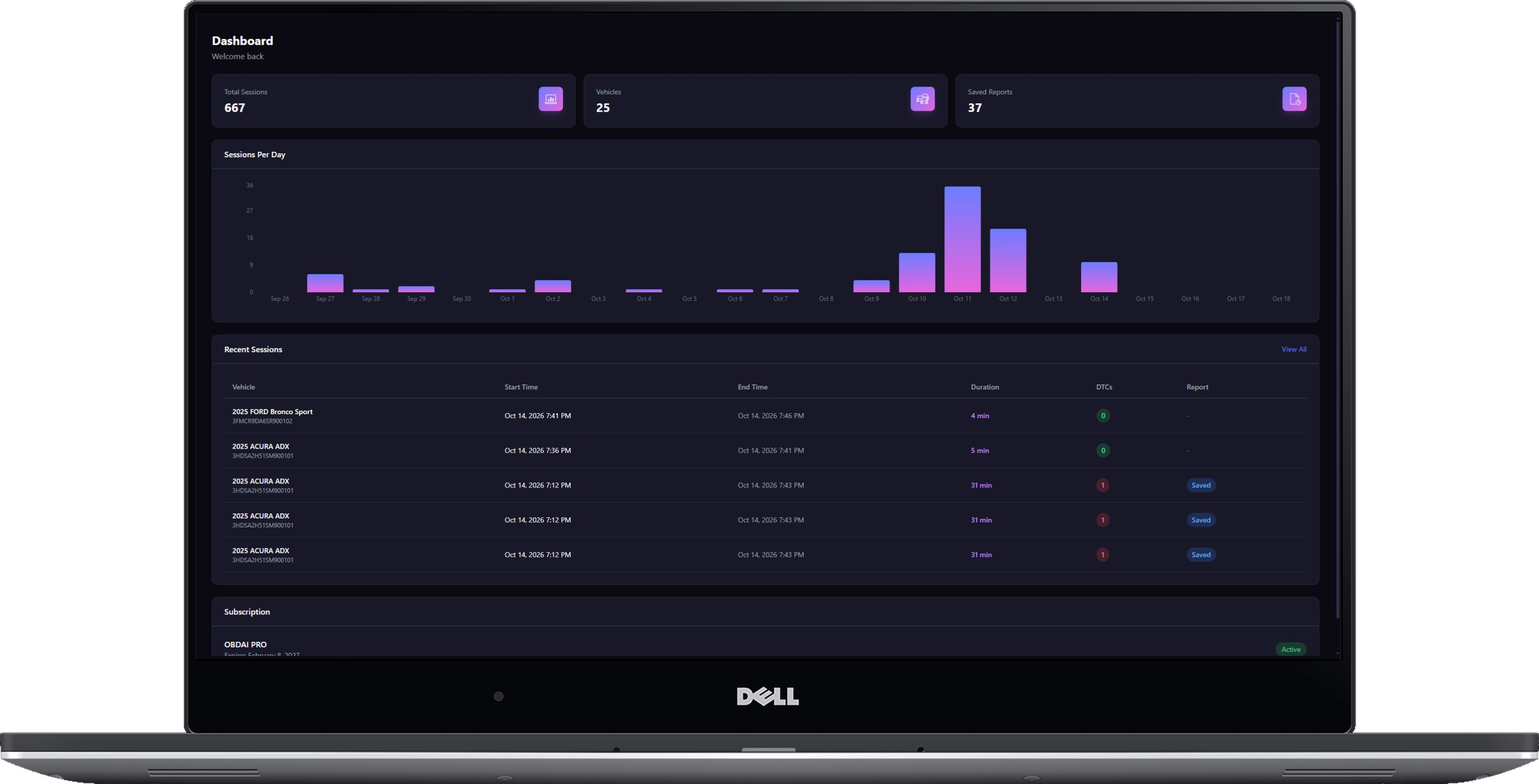
🌐 Web Dashboard

PRO is not an app upgrade. It’s cloud-backed infrastructure. View every vehicle, every session, every second-by-second chart from any browser. Generate and edit reports from your desk. Search your diagnostic history. Compare vehicles side by side. Capture in the field. Reason later at your leisure. That philosophy scales to fleets, multi-vehicle shops, and long diagnostic sessions.

💬 ARIA Web Chat with Memory

Talk to ARIA from any browser — not just the app. Start a conversation on your phone in the field, pick it up on your laptop at the desk. ARIA remembers every prior conversation about the vehicle: what was asked, what was answered, what you told it, what it already diagnosed. No repeating yourself. No lost context. Your entire diagnostic history with that vehicle is always at ARIA’s fingertips, layered on top of the real-time telemetry data. This is continuity no scan tool offers.

✍️ AI Report Editor

Generate reports from the web with a full markdown editor and live preview. Tell the AI to make changes — “add the customer’s complaint,” “emphasize the safety concern,” “rewrite the recommendation.” ARIA builds the narrative from your real diagnostic data. You edit and polish. The result is a professional report no scan tool printout can match.

🔍 Vehicle Intelligence

Go beyond the scan. PRO includes full vehicle intelligence — market value (trade-in, private party, dealer retail), title checks, auction history with photos and damage details, warranty status, maintenance schedules, common repairs, and sales history. Opt in per report and ARIA weaves the data into your diagnostic narrative. Know what the vehicle is worth. Know what it’s been through. Know what it needs.

♾️ Unlimited PDF Reports

No caps. No counting. Scan 10 cars a day, generate 10 reports. Every report is branded with your shop identity and backed by real telemetry data and AI analysis. Premium users get reports too — but PRO removes the limits because this is how you run a business, not a hobby.

🧠 Capture First. Reason Later.

Long, fat diagnostic sessions. Full telemetry. Second-by-second data streaming across every parameter the vehicle reports.

Then ARIA goes to work — AI reasoning, pattern spotting, cross-referencing historical sessions, building charts, telling a story. The mechanic doesn’t stare at numbers. ARIA tells you what you need to know.

That’s AI done right. Not a chatbot bolted onto a code reader. An agent that captures everything, reasons autonomously, and presents conclusions you can act on — and hand to a customer.

📦 What’s In The Box

🚀 OBDAI PRO Software (1 Year)

Everything in Premium, plus the professional toolkit:

  • Unlimited ARIA AI conversations
  • ARIA Web Chat — talk to ARIA from any browser, with full conversation memory and cross-device continuity
  • Drop photos, inspection reports, and repair estimates into the chat — ARIA reads them and reasons over them alongside your vehicle’s stored diagnostic data
  • ARIA remembers all prior conversations per vehicle — what was asked, answered, and diagnosed
  • Unlimited branded PDF diagnostic reports
  • Custom shop branding (logo, name, phone, email, address)
  • Web dashboard — generate, edit, and review reports from any browser
  • AI-powered report editor with markdown and live preview
  • Vehicle intelligence: market value, title check, auction history, warranty, maintenance schedules, common repairs
  • Vehicle history injection into reports (opt-in per report)
  • Full diagnostic history with trend analysis and second-by-second charts
  • Autonomous PID selection and guided diagnostics
  • Visual repair assistant with step-by-step videos
  • Vehicle recall data and comparison tools
  • EU VIN/Chassis decoding
  • Cloud sync across all devices
  • Priority support

⚡ Professional GEN 2 OBD2 Scanner

  • Advanced 25K80 chip with Bluetooth 5.0 for faster, more stable connections
  • Multi-protocol support — SAE J1850 PWM/VPW, ISO9141-2, ISO14230-4 KWP, ISO15765-4 CAN
  • Works with 1996+ gasoline vehicles, 2004+ diesel
  • Read/clear fault codes, freeze frame data, MIL status, vehicle info
  • Battery voltage monitoring and oxygen sensor testing
  • Compact design (47×46×24mm) — stays out of the way while driving
  • 1-year manufacturer warranty

📦 FREE U.S. Shipping

Free shipping to the lower 48 U.S. states. International shipping available for a flat $14.99.

💡 Who PRO Is For

🔧 Mobile Mechanics

Show up with a wireless OBD-II interface and a phone. Leave with a branded diagnostic report the customer can hold. “Here’s what I found, here’s what it means, here’s what I recommend.” That report is why they pay you $100+ for the visit instead of Googling the code themselves.

🏪 Independent Shops

You’re competing against dealerships with $8,000 Snap-on rigs. OBDAI PRO gives you AI-powered diagnostics, professional documentation, and vehicle intelligence at a fraction of the cost. Your reports look better than their scan tool printouts.

🚗 Pre-Purchase Inspectors

Auction history. Title check. Market value. Full diagnostic telemetry. All woven into one branded report. Hand it to the buyer and they know exactly what they’re getting. That report pays for your entire annual PRO subscription on the first job.

🚙 Car Flippers

Know what you’re buying before you bid. Know what’s wrong before you price. Generate a clean diagnostic report for the buyer that builds trust and moves inventory faster. Three or four flips and PRO has paid for itself ten times over.

Built by an Insider, Not a Startup

OBDAI is built by someone with 28 years in emissions testing and automotive diagnostics. Not a Silicon Valley team guessing what mechanics need. Someone who understands the workflows, the compliance headaches, the edge cases, and the technicians who deal with them every day. PRO is priced for seriousness — powerful capability at a fair price. No rent extraction. No legacy gouging. Just the right tool at the right cost.

💰 What Shops Actually Spend on Diagnostics

Professional scan tools cost $300–$12,000 for hardware alone — then $129–$795/year for software subscriptions. Shop management SaaS runs $179–$300/month. CARFAX for shops is $300/month.

OBDAI PRO is a fraction of that. AI-powered diagnostics, branded reports, vehicle intelligence, and a web dashboard — all for less than one month of the software you’re probably already paying for. The GEN 2 scanner is included.

⚙️ Universal Compatibility

✓ Works on Windows, iOS, and Android

One subscription works on all your devices — plus the web dashboard from any browser

✓ GEN 2 Scanner Protocol Support:

  • SAE J1850 PWM (41.6Kbaud) — Ford, Mazda
  • SAE J1850 VPW (10.4Kbaud) — GM, older vehicles
  • ISO9141-2 (5 baud init, 10.4Kbaud) — Asian, European vehicles
  • ISO14230-4 KWP (fast/slow init) — European vehicles
  • ISO15765-4 CAN (11bit & 29bit, 250-500 Kbaud) — Modern vehicles (2008+)

✓ Compatible Vehicles:

  • Gasoline: 1996+ (All OBD-II vehicles)
  • Diesel: 2004+
  • Hybrids & EVs: Most models with OBD-II port

Ford, Toyota, Honda, Chevrolet, Volkswagen, BMW, Audi, Mercedes, Nissan, Mazda, Subaru, Dodge, Ram, Jeep, Hyundai, Kia, Tesla, and virtually all other brands

🌍 Shipping & Support

Free U.S. Shipping: Free domestic shipping to the lower 48 states. International orders ship for a flat $14.99. Most U.S. orders arrive within 3–5 business days. International orders typically 7–14 business days. Import duties and VAT (where applicable) are customer responsibility.

Instant Software Access: Activate your PRO subscription immediately upon purchase. Start generating branded reports while you wait for your scanner to arrive.

Priority Support: PRO subscribers get priority email support with direct access to the founder. Typical response time: 24 hours or less.

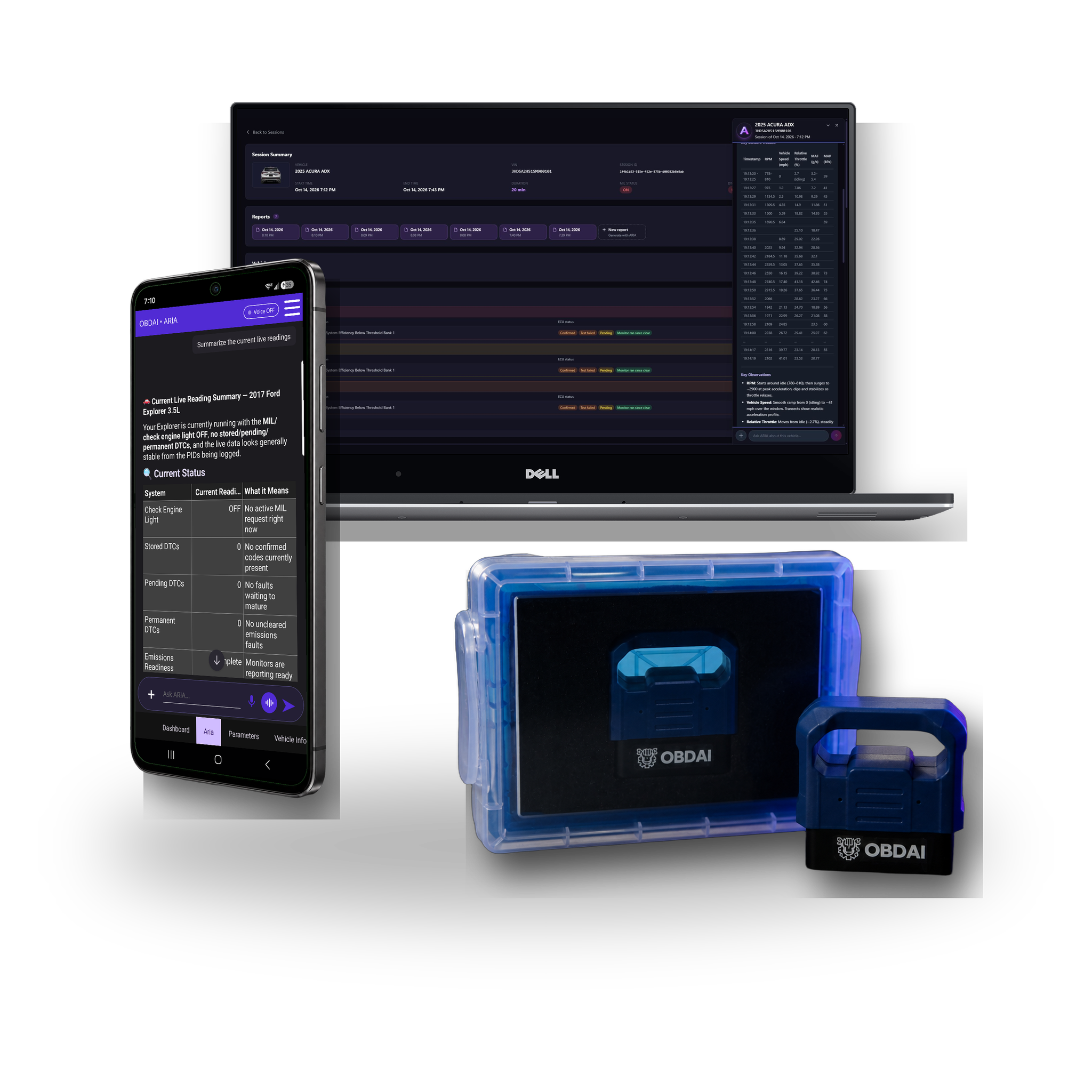
Product images are mockups for illustration purposes only. Tablets, phones, and laptops shown are not included. This bundle includes the GEN 2 wireless OBD-II interface and 1 year of OBDAI PRO (auto-renewing annual subscription, cancel anytime).

Start Running Your Shop on OBDAI PRO

1 Year of PRO — Branded Reports, Web Dashboard, Vehicle Intelligence

GEN 2 professional scanner & free U.S. shipping included

Then less than $23/mo, billed annually • Cancel anytime

ARIA deep research: factory information when the answer takes digging

Some questions can’t be settled from a search snippet: which pin is which on a connector, what a sensor should read unplugged, or the factory test procedure for a code. For those, open Research a question in the OBDAI app, type your question with the year, make, model and engine, and confirm. ARIA searches, opens and reads factory and other primary service sources, then returns a cited report with what she found and where she found it. A job usually takes a few minutes.

Research works from the question you type. It does not read your recorded session on its own, so include the readings you want checked, such as a voltage, a fuel trim or a code.

Why we built it

A shop technician chasing a power-loss complaint on a 2015 Chevrolet Cruze 1.4T asked ARIA for the upstream O2 sensor connector pinout. Quick search only turned up parts-store snippets, so she wouldn’t guess which pin was which. With the sensor unplugged he saw 1.275 V and spent the night treating it as a shorted sensor. GM’s factory procedure puts the unplugged bias at 1.5 to 3.0 V, more than a generic O2 reading can display, so that reading was normal. With deep research, ARIA found GM’s factory test procedure, gave the connector cavities with their tests, explained the 1.275 V reading and flagged that a parts-store pinout had the signal pins reversed.

Ask it things like

  • “2015 Chevrolet Cruze 1.4T: what is the upstream O2 sensor connector pinout, and what should it read unplugged? I measured 1.275 V.”
  • “2012 Ford F-150 5.0L: what is the factory test procedure for P0171, and what fuel-trim values should I expect at idle? Long-term trim on bank 1 reads +18%.”

What it brings back

  • Factory connector pinouts, wiring and circuit tests, specifications and DTC test procedures, when a credible source exists
  • The sources it cites, and the model years and engine they cover
  • A check of the readings you include, like the 1.275 V reading above
  • Conflicts between sources, such as a parts-store pinout that disagrees with the factory one, and what is still unresolved
  • One practical step to confirm it at the car

Your Pro plan includes 3 completed research jobs per month (Ultra includes 10). One job runs at a time per account. A job that fails or returns no cited report does not count. Research usually takes a few minutes and needs internet. Your normal ARIA questions and quick search keep their usual access. Source availability and applicability vary; research cannot guarantee a pinout, procedure or repair result.

Choose room for your diagnostic plan

You describe the problem; ARIA plans the readings, conditions and follow-ups. Check-ins and condition watches share one active-slot pool in any mixture.

Plan allowances. Existing purchased rights are preserved.
Allowance or capability Premium Pro Ultra
Active watches and check-ins, combined 2 5 10
Optional automatic follow-ups per connected session 8 20 40
Optional automatic follow-ups per account/month 100 300 600
ARIA deep research: completed jobs per account/month Not included 3; one job at a time 10; one job at a time
Normal ARIA questions and existing quick search Usual access Usual access Inherits Pro
Pro dashboard, reporting and shop branding Premium reporting rules Included Inherits Pro
Supported Windows J2534 connection Not included Not included One transferable Windows seat
Hardware in these GEN2 bundles GEN2 GEN2 GEN2; J2534 interface, PC and tablet excluded

Watches and check-ins require the app to remain open and connected. Cloud features require internet. Vehicle, ECU, adapter and sampling support determine the readings available; a slot is not a faster polling rate.

Already subscribed? Purchased Premium/Pro allowances continue through the applicable paid term, including protected historical 5-slot/20-follow-up and uncapped monthly promises where purchased. Perpetual rights remain protected. New limits are not a silent midterm reduction.

Additional information

OBDAI Annual Subscription

Plan

Pro

1 review for OBDAI Annual PRO — The Professional Diagnostic Platform

  1. Robert LaFeir (verified owner) –

Only logged in customers who have purchased this product may leave a review.

$299.00

Trusted by 400+ automotive professionals in independent shops and dealership bays.

OBD2 Scanner Gen 2 - Hardware Component

85 in stock

OBDAI Annual Subscription

85 in stock

See what ARIA makes of the evidence.

Real analysis from recorded vehicle sessions.

01 / ANALYZE

Understand the relationships

ARIA connects monitor results, operating conditions and parameter behavior.

02 / COMPARE

Put changes in context

Compare sessions and check the distance from the ECU’s reported limits.

03 / EXPLAIN

Make the findings useful

Keep the analysis with the vehicle and share a clear report.

ARIA evaluates an oxygen sensor monitor change against the ECU minimum
ARIA · MODE 6 + HISTORY

A changed reading. A reasoned answer.

In this recorded example, ARIA compares 0.583 V with 0.132 V against a 0.050 V minimum. She explains the remaining margin and why a single monitor snapshot does not establish deterioration.

ARIA interprets load intake pressure temperature throttle and fuel trims together
ARIA · PARAMETER ANALYSIS

One reading gains meaning from the others.

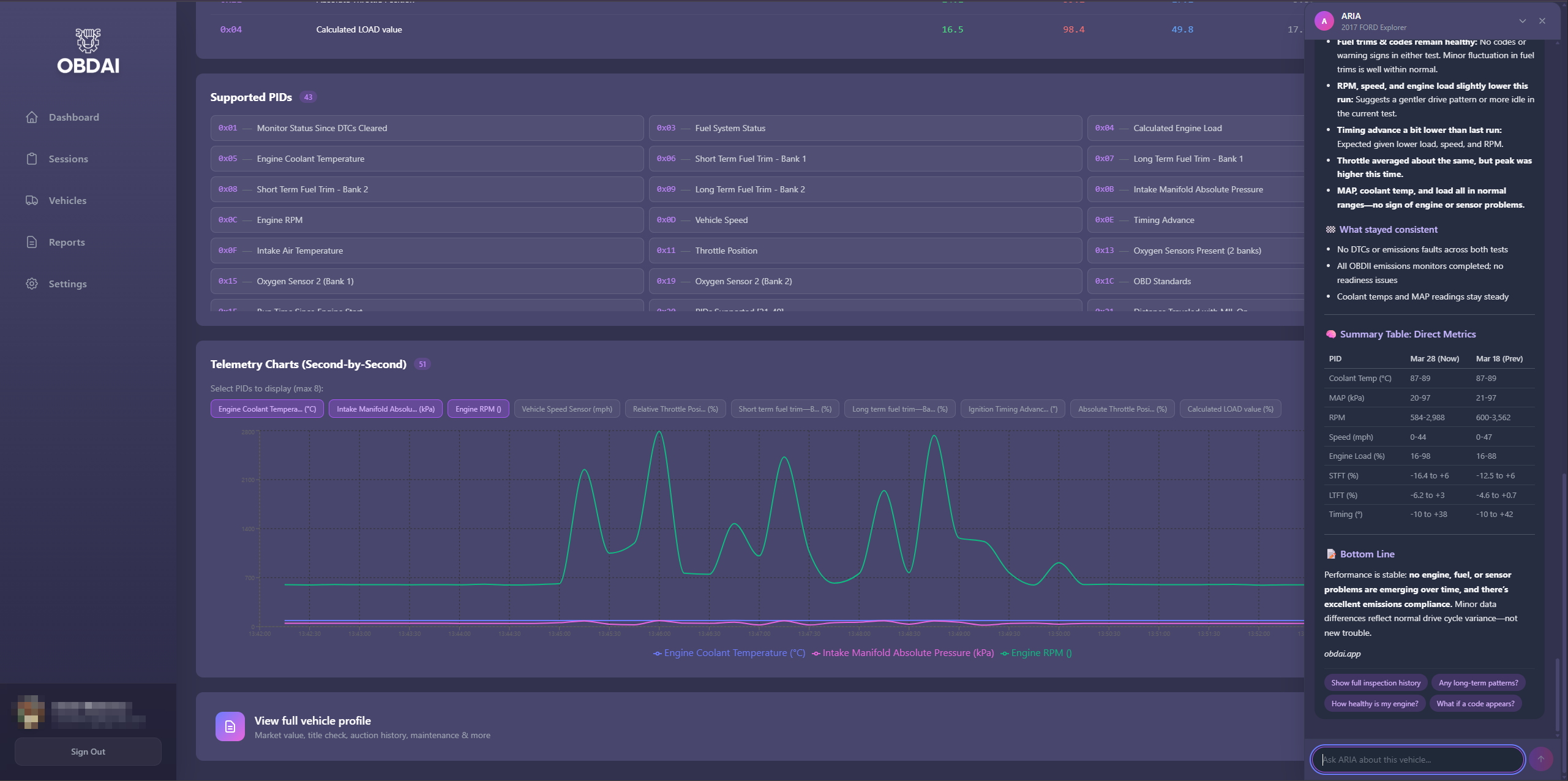
ARIA considers coolant temperature, load, manifold pressure, throttle and fuel trims together. The explanation ties the measurements to the vehicle’s operating state.

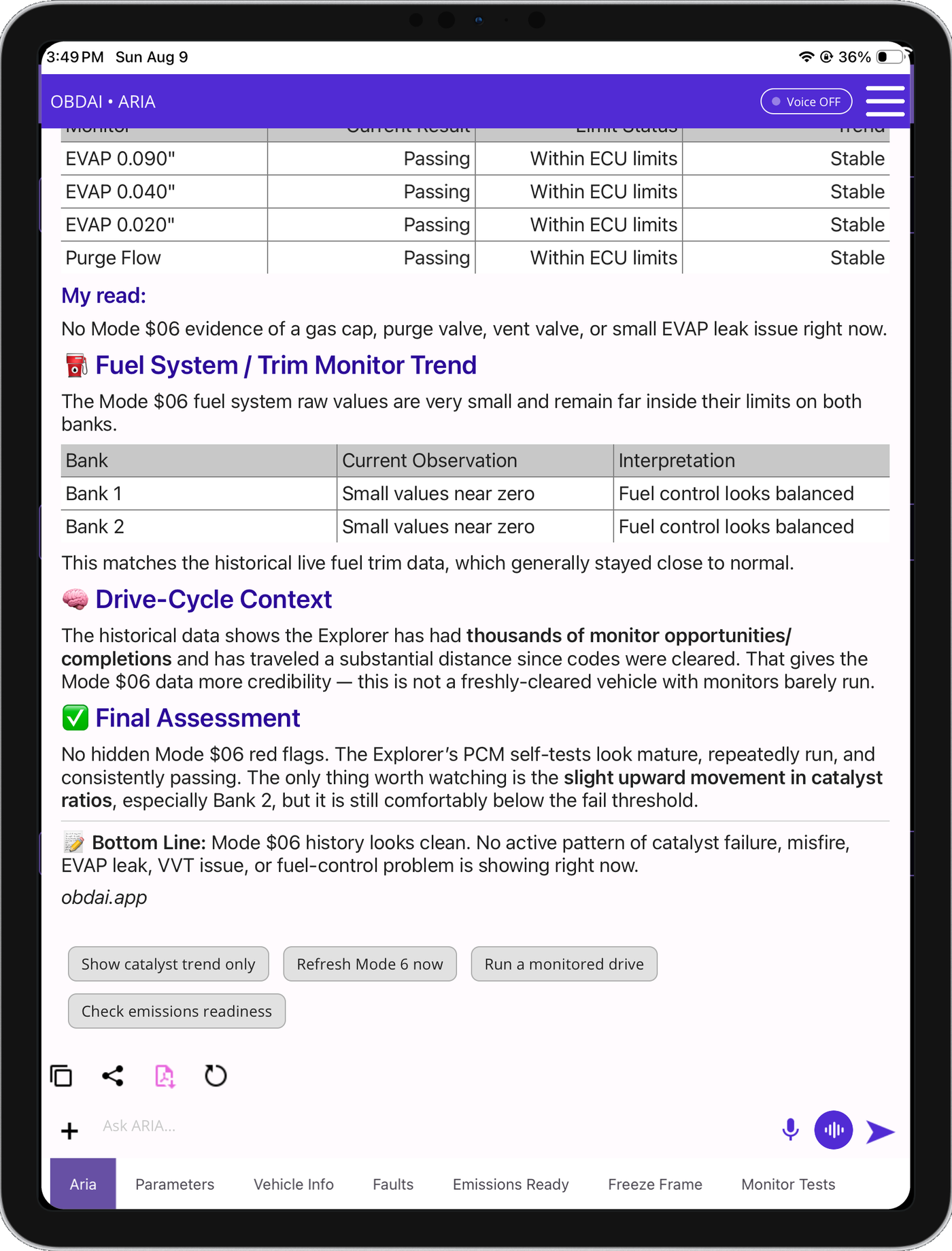
ARIA combines historical monitor results fuel trim history and drive-cycle context
ARIA · HISTORICAL ANALYSIS

Give today’s results a history.

ARIA compares monitor trends with past fuel trims and drive-cycle context. In this example, she identifies a catalyst ratio worth watching while explaining that it remains below the failure threshold.

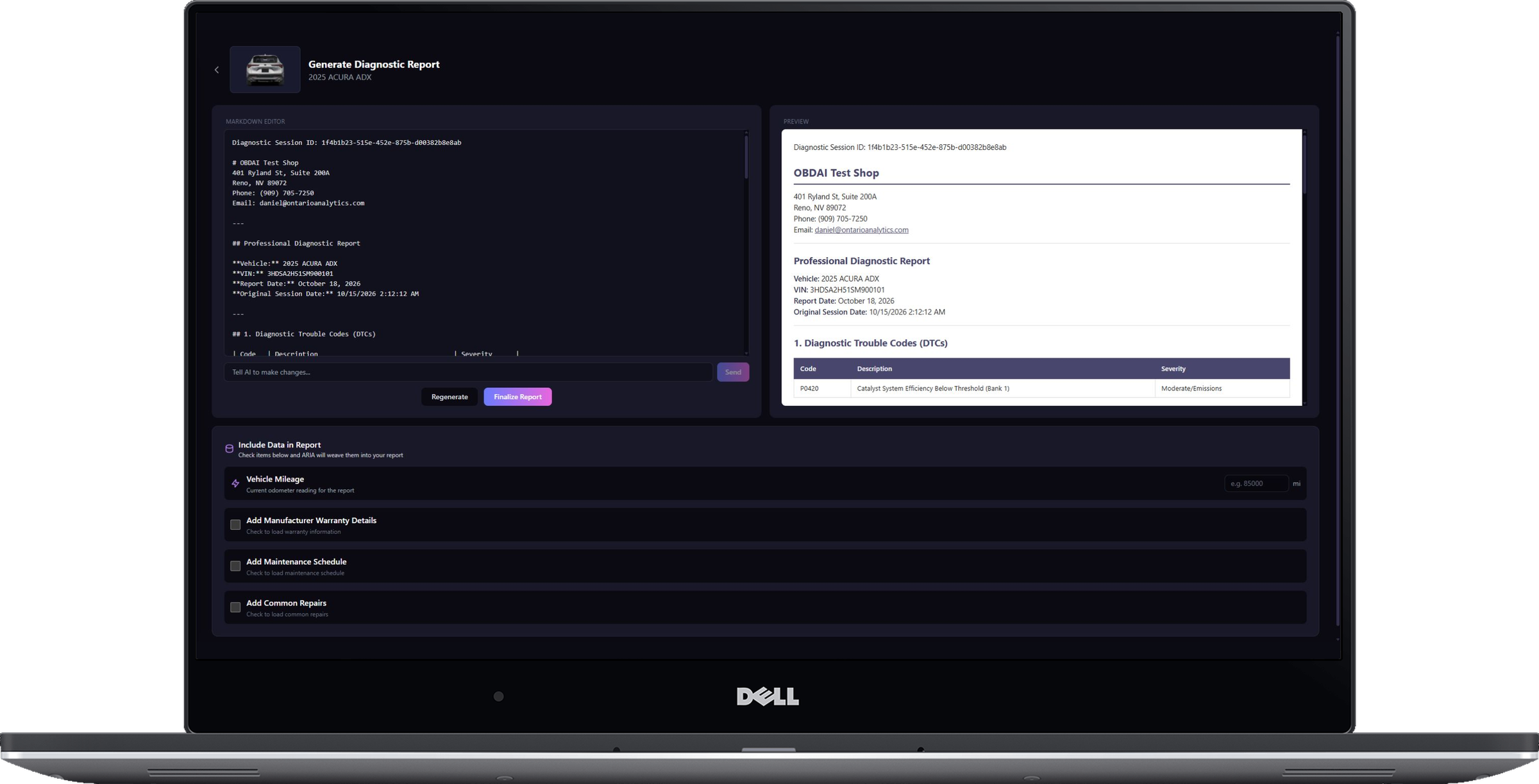
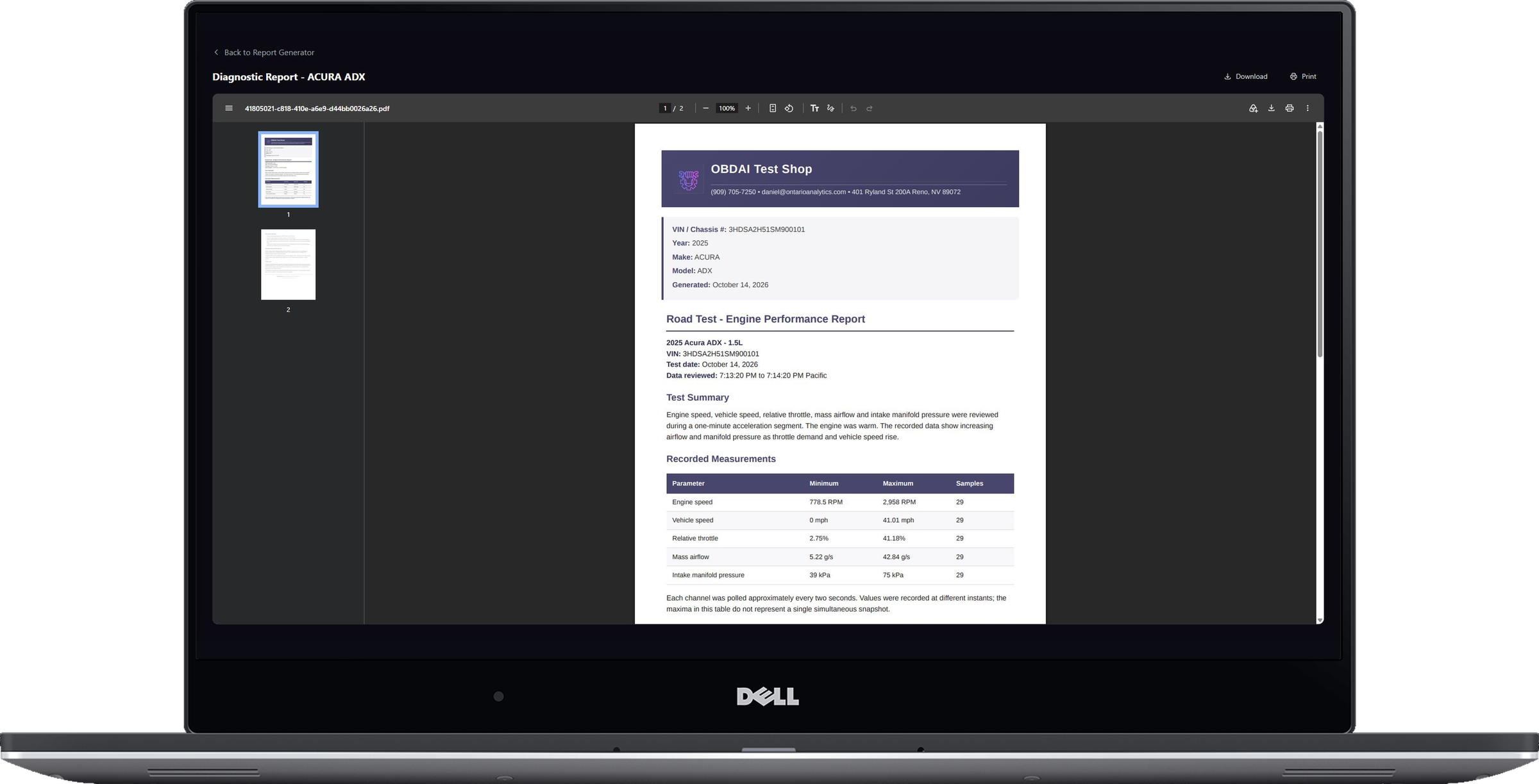
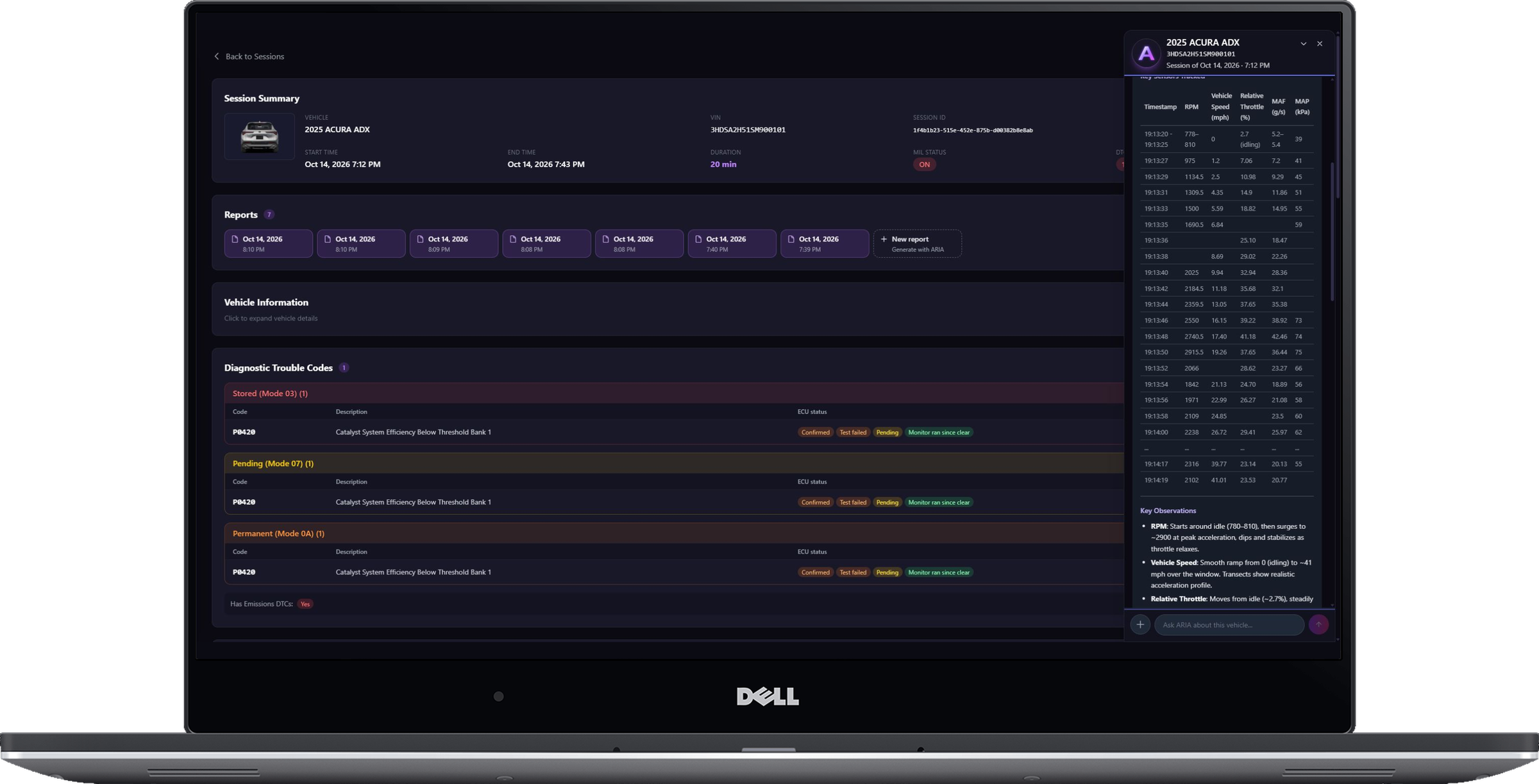
PRO Diagnostic Report builder on laptopSaved PRO diagnostic report viewer on laptop
PRO · REPORT BUILDER + SAVED REPORTS

Build it. Save it. Show the customer.

Continue the analysis with interactive ARIA Web Chat, choose the source session and turn the findings into an editable, shop-branded report with repair and maintenance context.

  • Unlimited editable reports with custom shop branding
  • Repair estimates and maintenance recommendations
  • Market, auction, repair and sales-history context
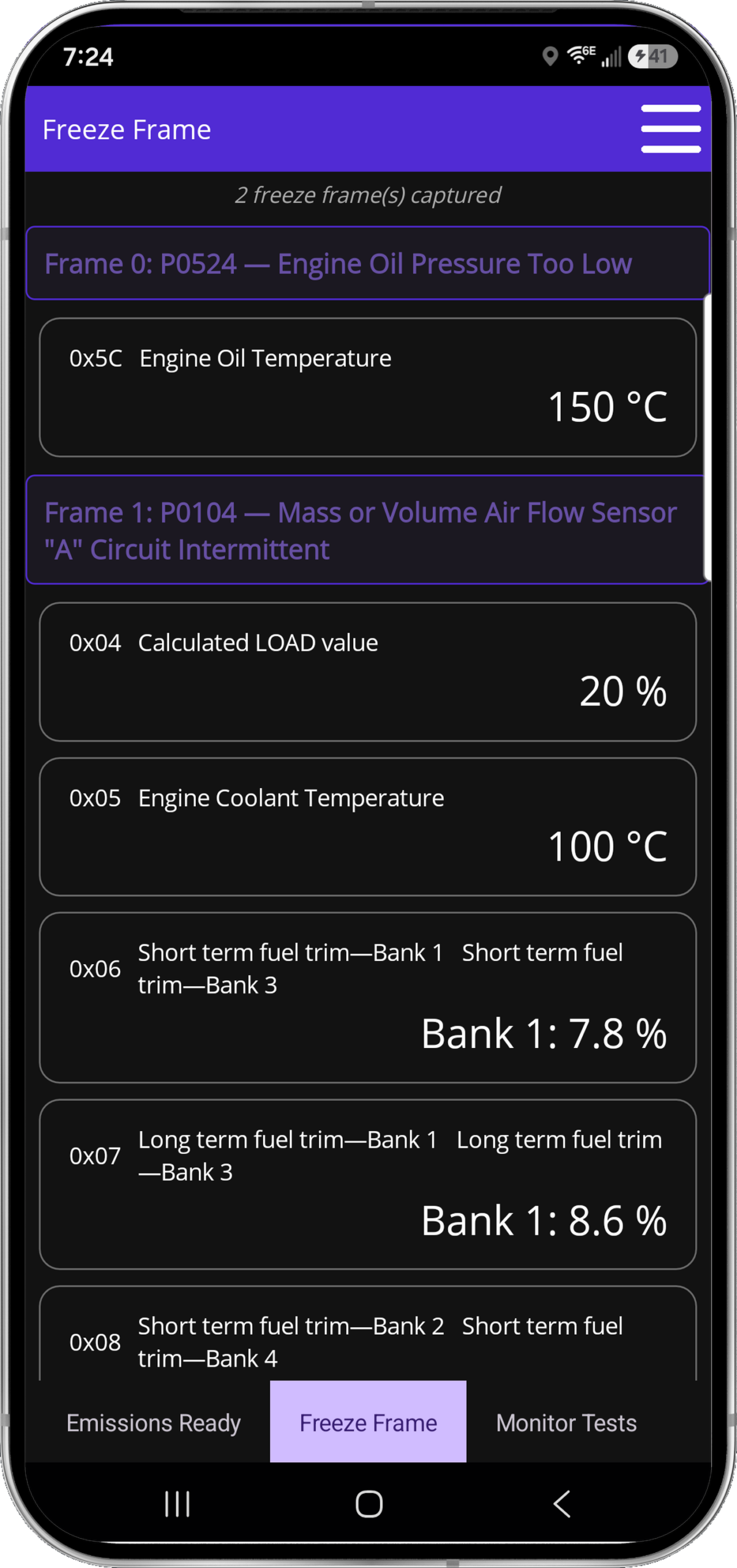
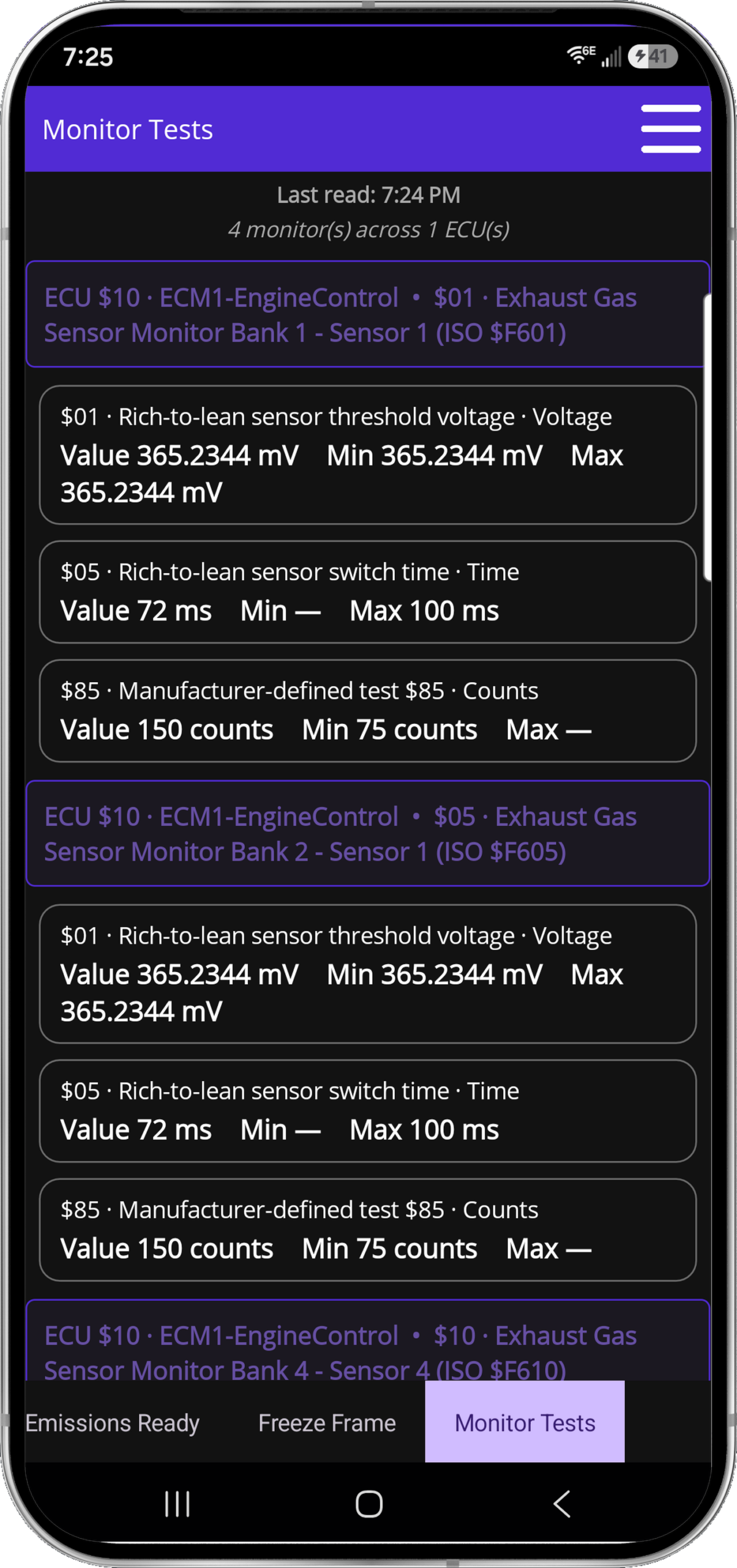
Freeze FrameMode 6
FULL J1979 EVIDENCE

Freeze Frame and Mode 6. Right where they belong.

See the vehicle at the moment the fault set, then check the monitor evidence manufacturers use to judge component performance.

  • Captured Freeze Frame events
  • Mode 6 monitor results and limits
  • Readiness, codes and live data together
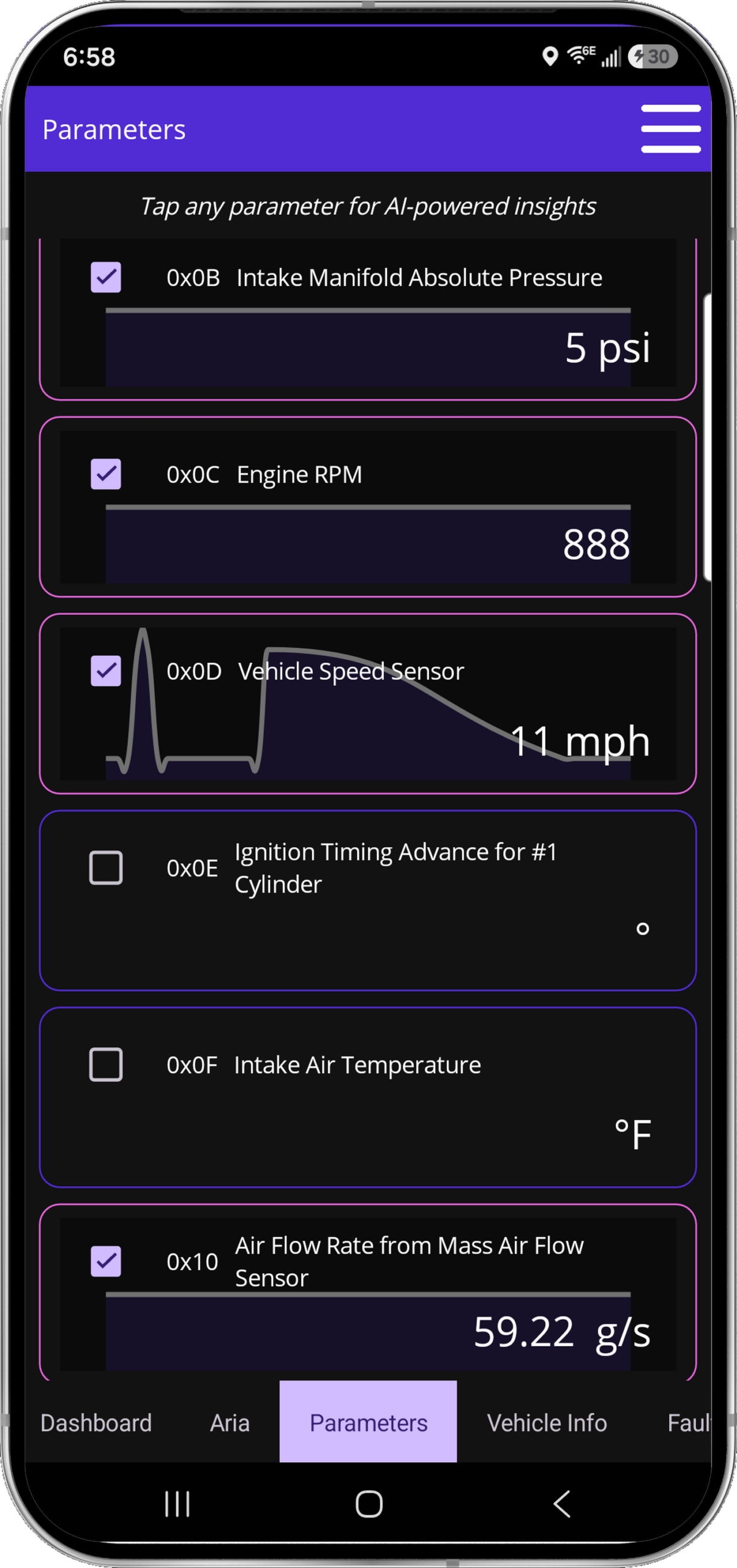
Live parametersGauge dashboardReadiness
LIGHT + DARK · EVERYDAY TOOLS

Every screen earns its place.

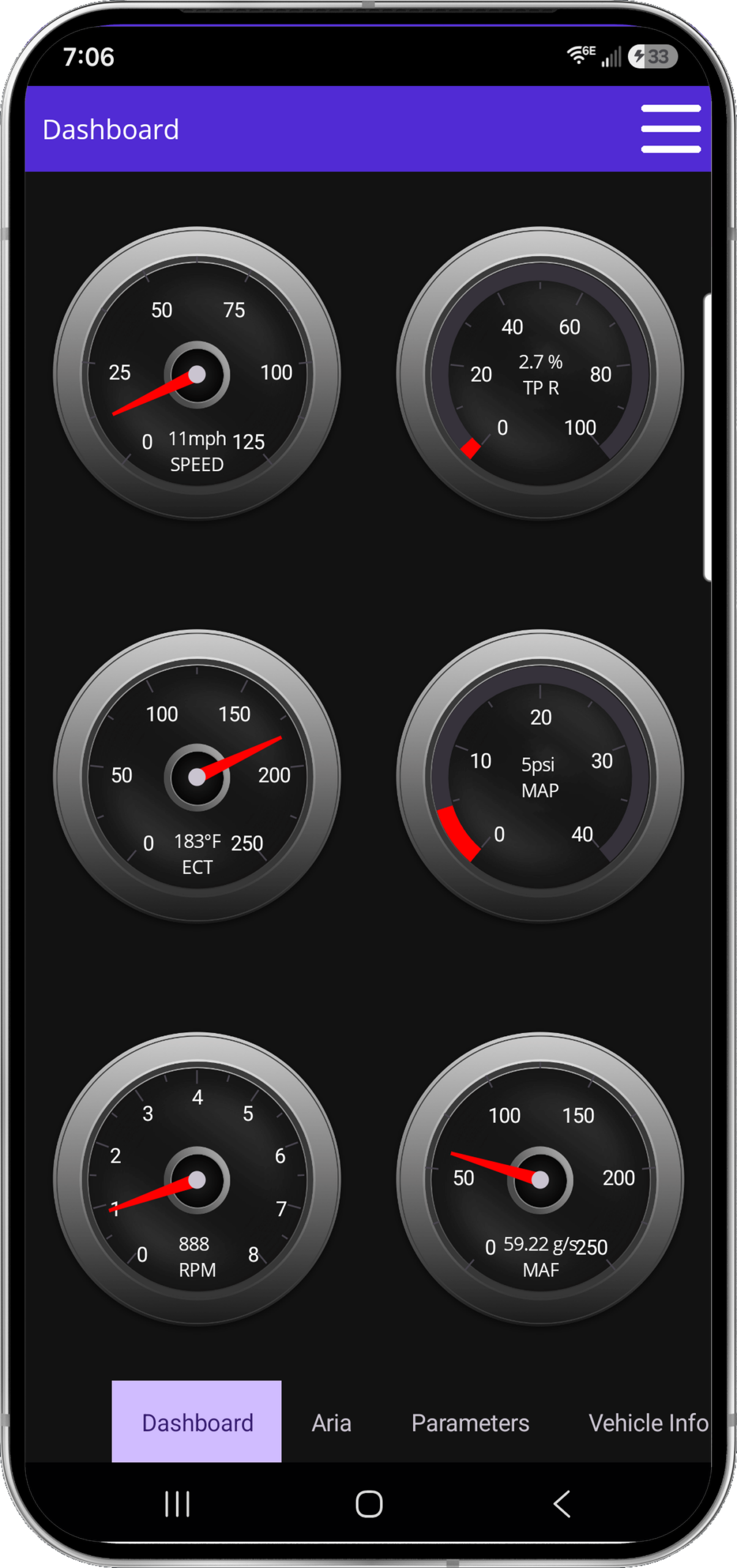
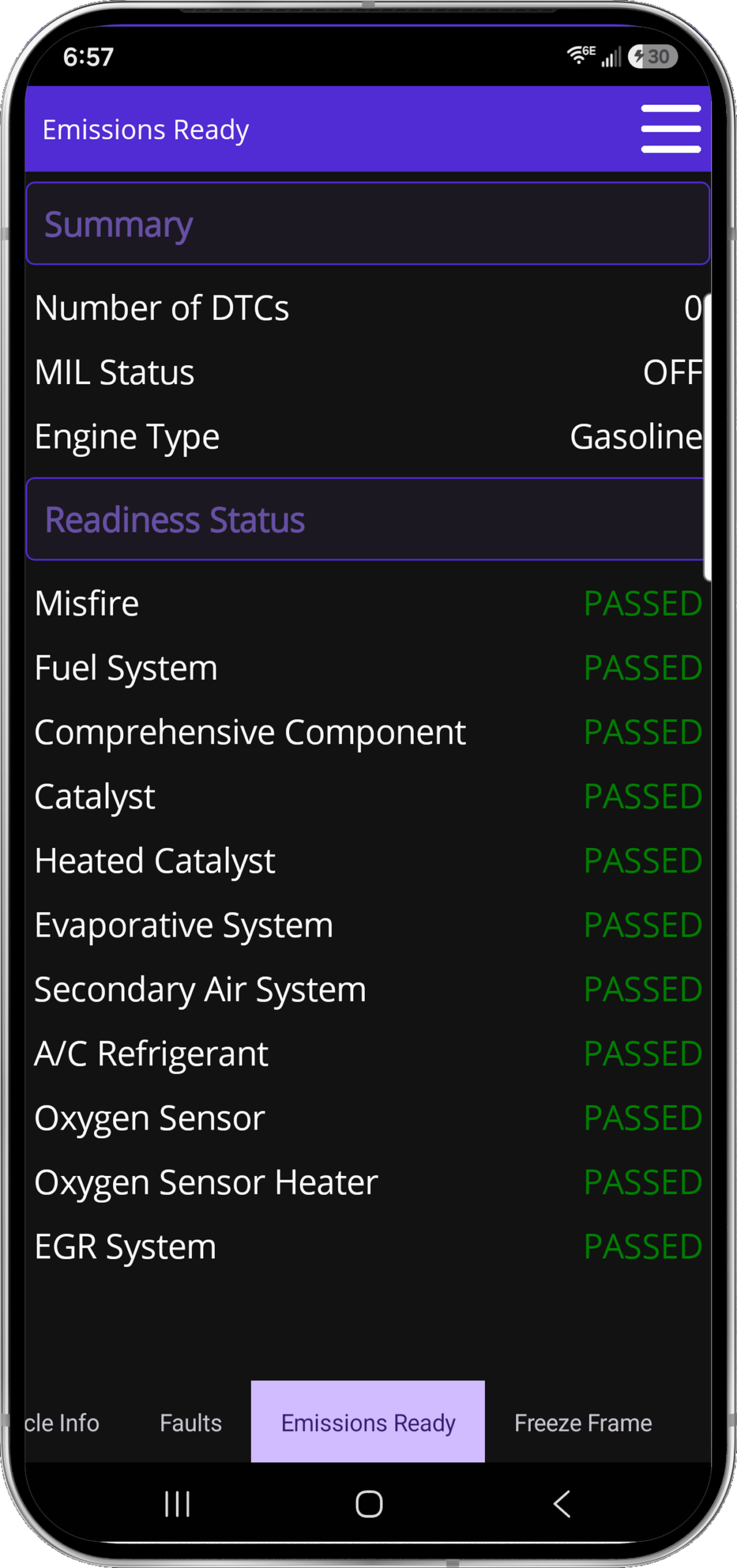
Selectable parameter graphs, six fixed dashboard gauges, emissions readiness and complete parameter coverage—presented as the actual product, not caption art.

Included scanner hardware
THE HARDWARE

One adapter. The full workflow.

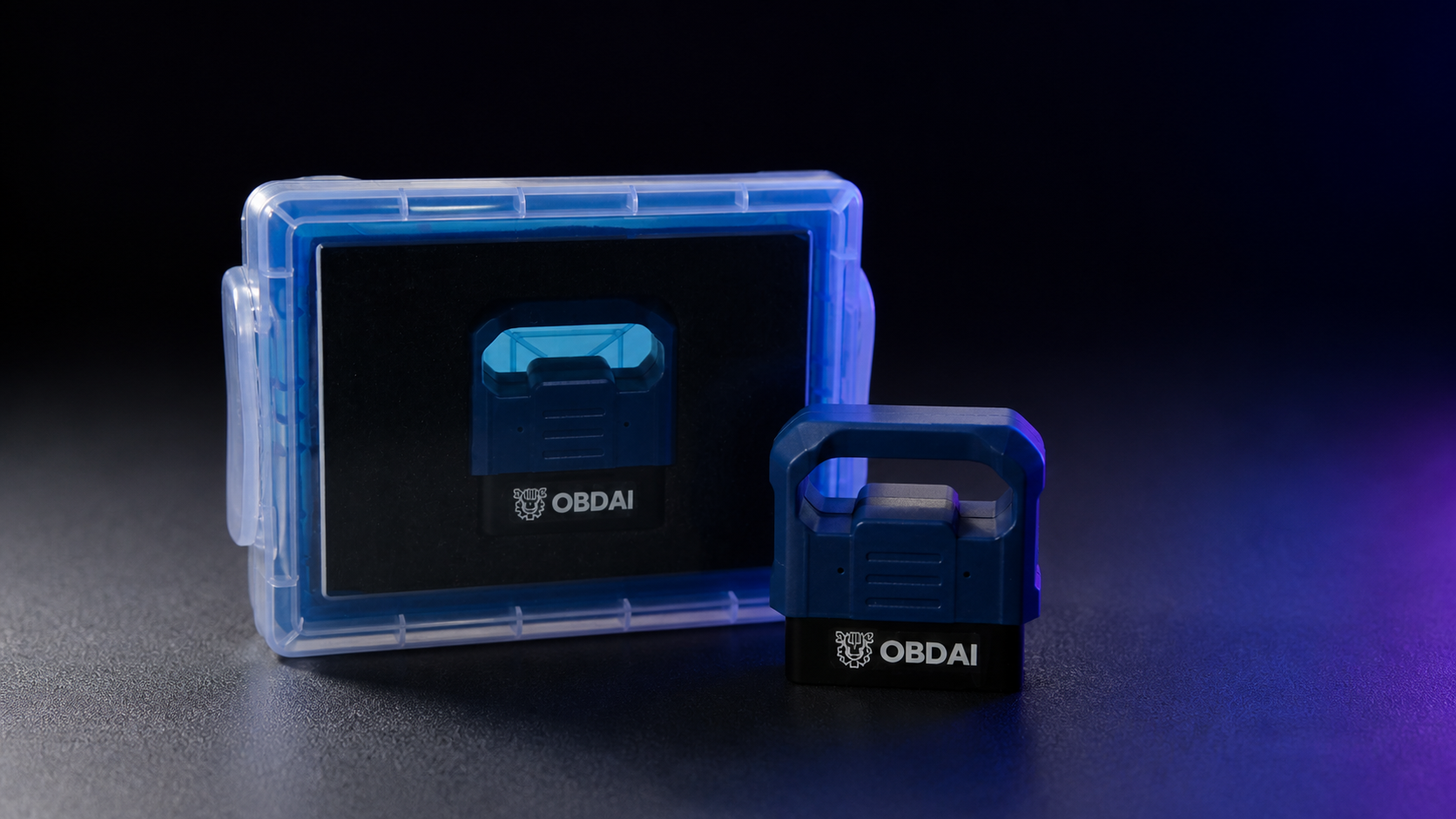
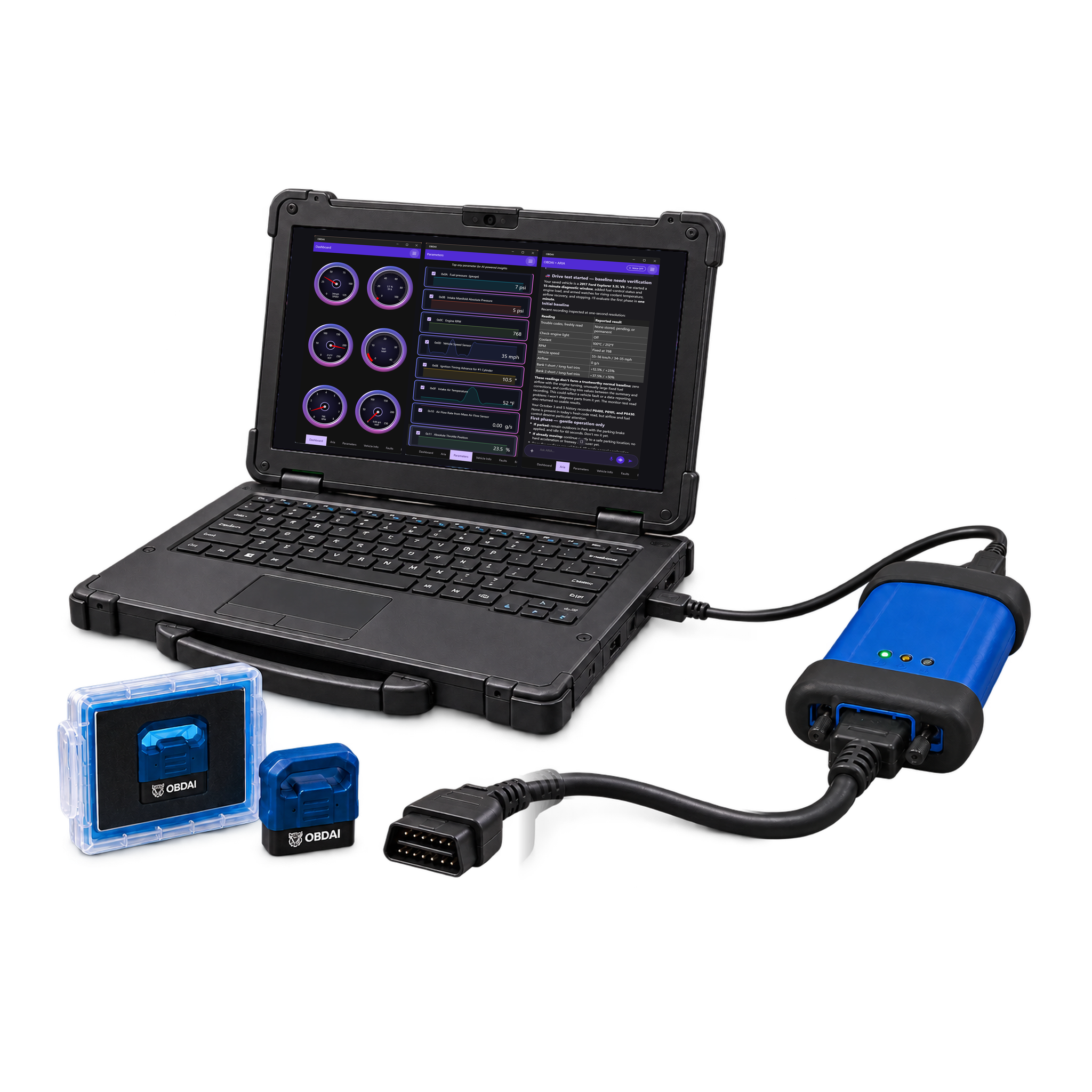
The OBD BLE GEN2 adapter connects the vehicle to OBDAI and enables SAE J1979-2 support. It arrives protected in its own case.

ARIA deep research

Factory answers. Sources included.

Ask ARIA for connector pinouts, wiring tests, specifications or factory diagnostic procedures. She digs through factory and primary service sources and returns a cited report with a practical next test.

Give her the vehicle, your question and any readings you want checked, then approve the research in chat.

Pro: 3 research jobs/month · Ultra: 10

Pro / What you get

Turn the diagnosis into a customer-ready repair plan

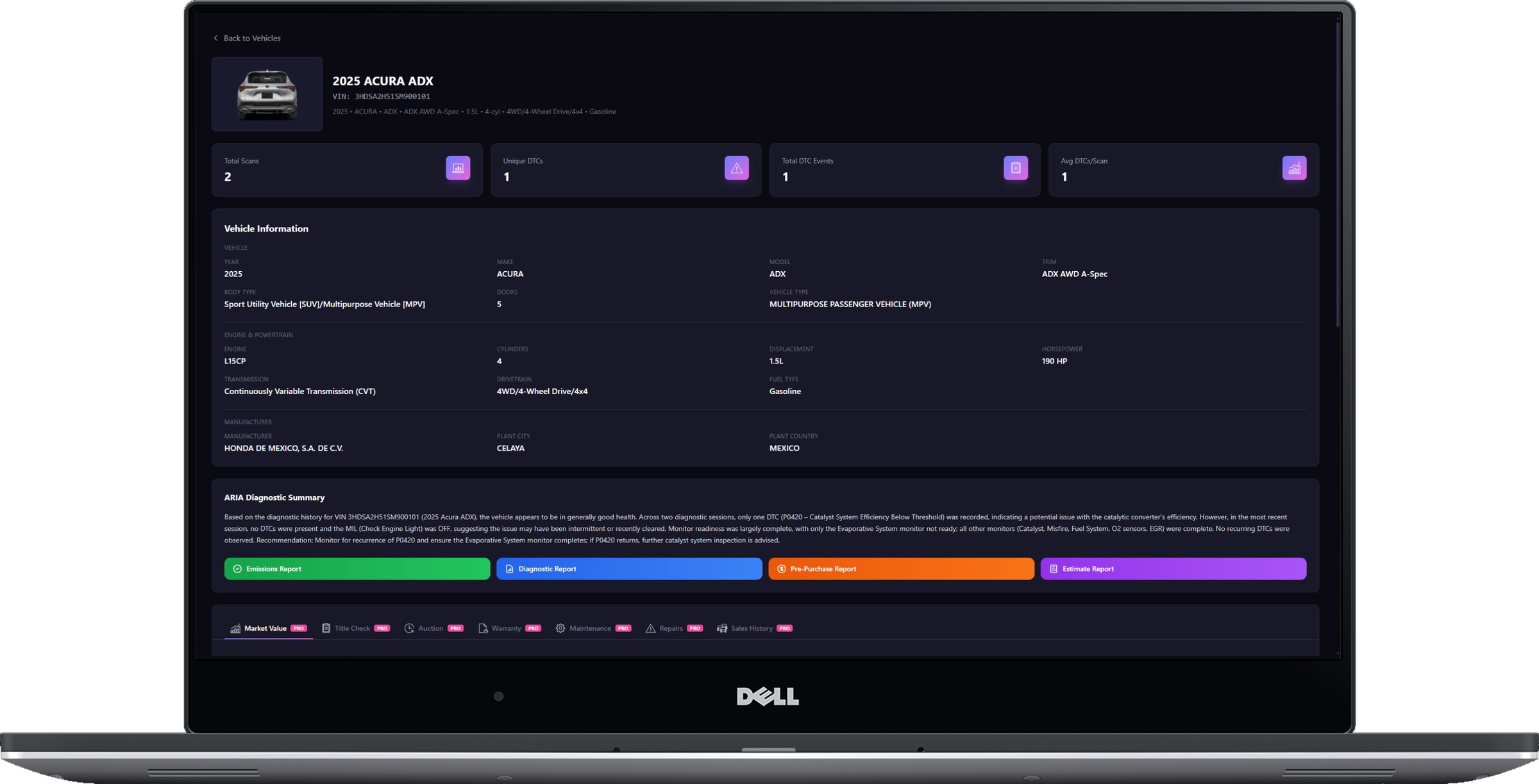
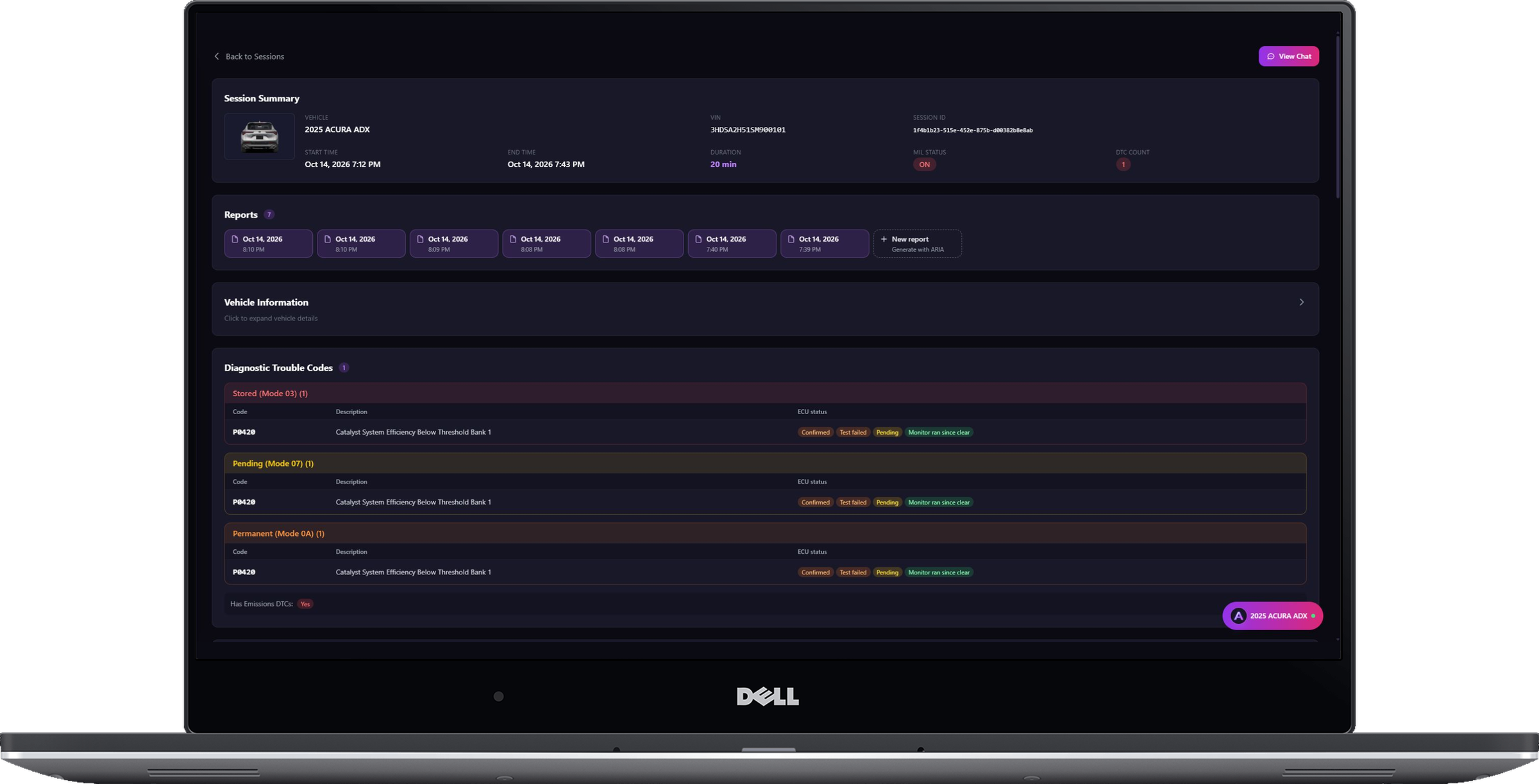
Keep the diagnostic evidence, repair pricing and customer communication in one workflow. Pro adds the business tools that turn your findings into customer-ready work.

Pro capability sheet
CapabilityWhat you can do
Everything in PremiumKeep ARIA-led road tests, standard diagnostics, recorded-data review and vehicle memory.
Manufacturer-specific dataARIA goes past the engine computer into modules like body control, brakes, airbags, power steering, parking aid, trailer brake, transfer case, climate, seats and EV battery. Available modules and readings vary by vehicle and adapter type.
OBD-II — J1979-1 & J1979-2 (OBDonUDS)Check supported fault codes, live data, freeze frame, Mode 6 and readiness. Includes OBDonUDS through GEN2.
Build the repair estimateTurn a scan into a printable estimate with parts and labor line items and a customer signature line.
Choose the repair priceUse national-average independent-shop or dealer pricing, or enter your own parts and labor amounts.
Choose the report for the jobCreate diagnostic, repair estimate, emissions inspection and pre-purchase inspection reports.
Put your shop on itEdit shop-branded reports, ask AI for changes, and finalize a customer-ready PDF.
Research the difficult questionOn request, ARIA researches factory pinouts, circuit tests, specifications and diagnostic procedures in chat.
Work with ARIA on the webContinue the session in interactive ARIA Web Chat and the web report builder.

Repair estimates use all-inclusive independent-shop or dealer benchmarks, or your own parts and labor amounts per line. A signature line is included. Emissions reports are pre-checks, not official inspection certificates.

Factory-information research runs on request in ARIA chat, after you agree, and depends on published source availability.

Premium / Pro / Ultra

Choose the workflow your next job needs

Every plan puts ARIA in charge of the scan tool: tell her the symptom, talk or send a photo, and let her choose readings, schedule check-ins and watch for changes. She reviews the recorded drive second by second and remembers the vehicle. Choose the tools you need to turn that evidence into your next step.

Premium, Pro and Ultra — capabilities at a glance
What you needPremiumProUltra
Best fitFind the next test before buying partsDiagnose, price and document shop workThe Pro workflow through Windows J2534
Standard OBD-II data — SAE J1979-1IncludedIncludedIncluded
OBDonUDS — SAE J1979-2Not included todayWith GEN2With GEN2 or Windows J2534
Browser workflowHistory with website purchasesInteractive ARIA and report builderAll Pro web tools
Repair estimatesNot includedParts and labor, price choices and a signature lineAll Pro estimate tools
Report workflowApp PDF exportDiagnostic, repair, emissions and pre-purchase reportsAll Pro report types
Factory information researchNot includedOn request in ARIA chatOn request in ARIA chat
Windows J2534Not includedNot includedOne transferable Windows seat
PremiumView capabilities
Premium capabilities
What you needPremium
Best fitFind the next test before buying parts
Standard OBD-II data — SAE J1979-1Included
OBDonUDS — SAE J1979-2Not included today
Browser workflowHistory with website purchases
Repair estimatesNot included
Report workflowApp PDF export
Factory information researchNot included
Windows J2534Not included
ProThis plan
Pro capabilities
What you needPro
Best fitDiagnose, price and document shop work
Standard OBD-II data — SAE J1979-1Included
OBDonUDS — SAE J1979-2With GEN2
Browser workflowInteractive ARIA and report builder
Repair estimatesParts and labor, price choices and a signature line
Report workflowDiagnostic, repair, emissions and pre-purchase reports
Factory information researchOn request in ARIA chat
Windows J2534Not included
UltraView capabilities
Ultra capabilities
What you needUltra
Best fitThe Pro workflow through Windows J2534
Standard OBD-II data — SAE J1979-1Included
OBDonUDS — SAE J1979-2With GEN2 or Windows J2534
Browser workflowAll Pro web tools
Repair estimatesAll Pro estimate tools
Report workflowAll Pro report types
Factory information researchOn request in ARIA chat
Windows J2534One transferable Windows seat

Every first-year bundle includes a shipped GEN2 adapter. Renewal is service only. Prices, renewals and allowances are shown in the purchase summary.

Premium browser history is included with website purchases; app-store Premium does not include dashboard access. Pro and Ultra add interactive ARIA Web Chat and web report tools.

See what ARIA makes of the evidence.

Real analysis from recorded vehicle sessions.

01 / ANALYZE

Understand the relationships

ARIA connects monitor results, operating conditions and parameter behavior.
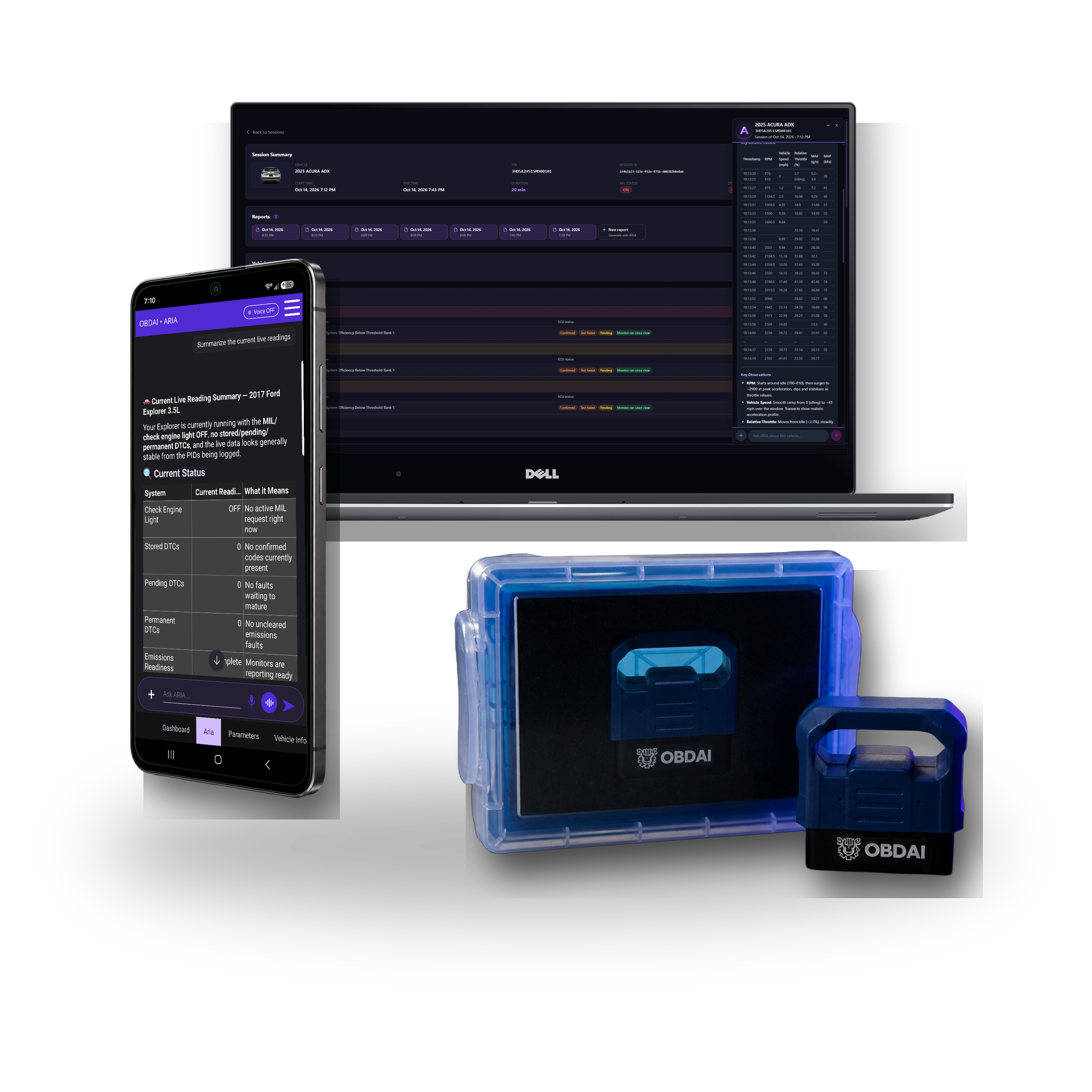
02 / COMPARE

Put changes in context

Compare sessions and check the distance from the ECU’s reported limits.

03 / EXPLAIN

Make the findings useful

Keep the analysis with the vehicle and share a clear report.

ARIA evaluates an oxygen sensor monitor change against the ECU minimum
ARIA · MODE 6 + HISTORY

A changed reading. A reasoned answer.

In this recorded example, ARIA compares 0.583 V with 0.132 V against a 0.050 V minimum. She explains the remaining margin and why a single monitor snapshot does not establish deterioration.

ARIA interprets load intake pressure temperature throttle and fuel trims together
ARIA · PARAMETER ANALYSIS

One reading gains meaning from the others.

ARIA considers coolant temperature, load, manifold pressure, throttle and fuel trims together. The explanation ties the measurements to the vehicle’s operating state.

ARIA combines historical monitor results fuel trim history and drive-cycle context
ARIA · HISTORICAL ANALYSIS

Give today’s results a history.

ARIA compares monitor trends with past fuel trims and drive-cycle context. In this example, she identifies a catalyst ratio worth watching while explaining that it remains below the failure threshold.

Shareable Premium report on laptop
SHAREABLE REPORTS

Keep the evidence together.

Turn the session into a clear OBDAI report you can download, share and review later with the vehicle history.

Freeze FrameMode 6
FULL J1979 EVIDENCE

Freeze Frame and Mode 6. Right where they belong.

See the vehicle at the moment the fault set, then check the monitor evidence manufacturers use to judge component performance.

  • Captured Freeze Frame events
  • Mode 6 monitor results and limits
  • Readiness, codes and live data together
Live parametersGauge dashboardReadiness
LIGHT + DARK · EVERYDAY TOOLS

Every screen earns its place.

Selectable parameter graphs, six fixed dashboard gauges, emissions readiness and complete parameter coverage—presented as the actual product, not caption art.

Included scanner hardware
THE HARDWARE

Faster GEN2 data. The complete Premium workflow.

The included OBD BLE GEN2 adapter adds BLE 5.0, broader protocol support and up to six compatible sensor readings per exchange.

Premium / What you get

Find the next test before buying the next part

Investigate the symptom before replacing parts on a guess. ARIA runs the diagnostic workflow; the included GEN2 adapter connects her to the vehicle.

Premium capability sheet
CapabilityWhat you can do
Start with the symptomTell ARIA what the car is doing. Use voice, text or a photo to give her the context.
Run the road testARIA chooses readings, schedules check-ins and watches key signals while you drive.
Replay what happenedReview the drive second by second so an intermittent problem has evidence behind it.
Standard OBD-II data — SAE J1979-1Check supported fault codes, live data, freeze frame, Mode 6 and emissions readiness.
Review the recorded evidenceARIA can review all available recorded standard OBD II values from your session.
Keep the vehicle contextUse vehicle memory and diagnostic history to pick up where you left off.
Take the findings with youExport a PDF report from the app.
Review history in a browserWebsite-purchased Premium includes browser history access.
Connect with GEN2The first-year bundle includes a shipped GEN2 adapter.

Standard diagnostics use SAE J1979. Available readings and tests depend on the vehicle. OBDonUDS is included with Pro and Ultra today.

Premium includes app PDF export. Web repair estimates, shop-branded reports, emissions pre-check reports and pre-purchase reports are Pro/Ultra features.

Premium / Pro / Ultra

Choose the workflow your next job needs

Every plan puts ARIA in charge of the scan tool: tell her the symptom, talk or send a photo, and let her choose readings, schedule check-ins and watch for changes. She reviews the recorded drive second by second and remembers the vehicle. Choose the tools you need to turn that evidence into your next step.

Premium, Pro and Ultra — capabilities at a glance
What you needPremiumProUltra
Best fitFind the next test before buying partsDiagnose, price and document shop workThe Pro workflow through Windows J2534
Standard OBD-II data — SAE J1979-1IncludedIncludedIncluded
OBDonUDS — SAE J1979-2Not included todayWith GEN2With GEN2 or Windows J2534
Browser workflowHistory with website purchasesInteractive ARIA and report builderAll Pro web tools
Repair estimatesNot includedParts and labor, price choices and a signature lineAll Pro estimate tools
Report workflowApp PDF exportDiagnostic, repair, emissions and pre-purchase reportsAll Pro report types
Factory information researchNot includedOn request in ARIA chatOn request in ARIA chat
Windows J2534Not includedNot includedOne transferable Windows seat
PremiumThis plan
Premium capabilities
What you needPremium
Best fitFind the next test before buying parts
Standard OBD-II data — SAE J1979-1Included
OBDonUDS — SAE J1979-2Not included today
Browser workflowHistory with website purchases
Repair estimatesNot included
Report workflowApp PDF export
Factory information researchNot included
Windows J2534Not included
ProView capabilities
Pro capabilities
What you needPro
Best fitDiagnose, price and document shop work
Standard OBD-II data — SAE J1979-1Included
OBDonUDS — SAE J1979-2With GEN2
Browser workflowInteractive ARIA and report builder
Repair estimatesParts and labor, price choices and a signature line
Report workflowDiagnostic, repair, emissions and pre-purchase reports
Factory information researchOn request in ARIA chat
Windows J2534Not included
UltraView capabilities
Ultra capabilities
What you needUltra
Best fitThe Pro workflow through Windows J2534
Standard OBD-II data — SAE J1979-1Included
OBDonUDS — SAE J1979-2With GEN2 or Windows J2534
Browser workflowAll Pro web tools
Repair estimatesAll Pro estimate tools
Report workflowAll Pro report types
Factory information researchOn request in ARIA chat
Windows J2534One transferable Windows seat

Every first-year bundle includes a shipped GEN2 adapter. Renewal is service only. Prices, renewals and allowances are shown in the purchase summary.

Premium browser history is included with website purchases; app-store Premium does not include dashboard access. Pro and Ultra add interactive ARIA Web Chat and web report tools.

See what ARIA makes of the evidence.

Real analysis from recorded vehicle sessions.

01 / ANALYZE

Understand the relationships

ARIA connects monitor results, operating conditions and parameter behavior.
02 / COMPARE

Put changes in context

Compare sessions and check the distance from the ECU’s reported limits.

03 / EXPLAIN

Make the findings useful

Keep the analysis with the vehicle and share a clear report.

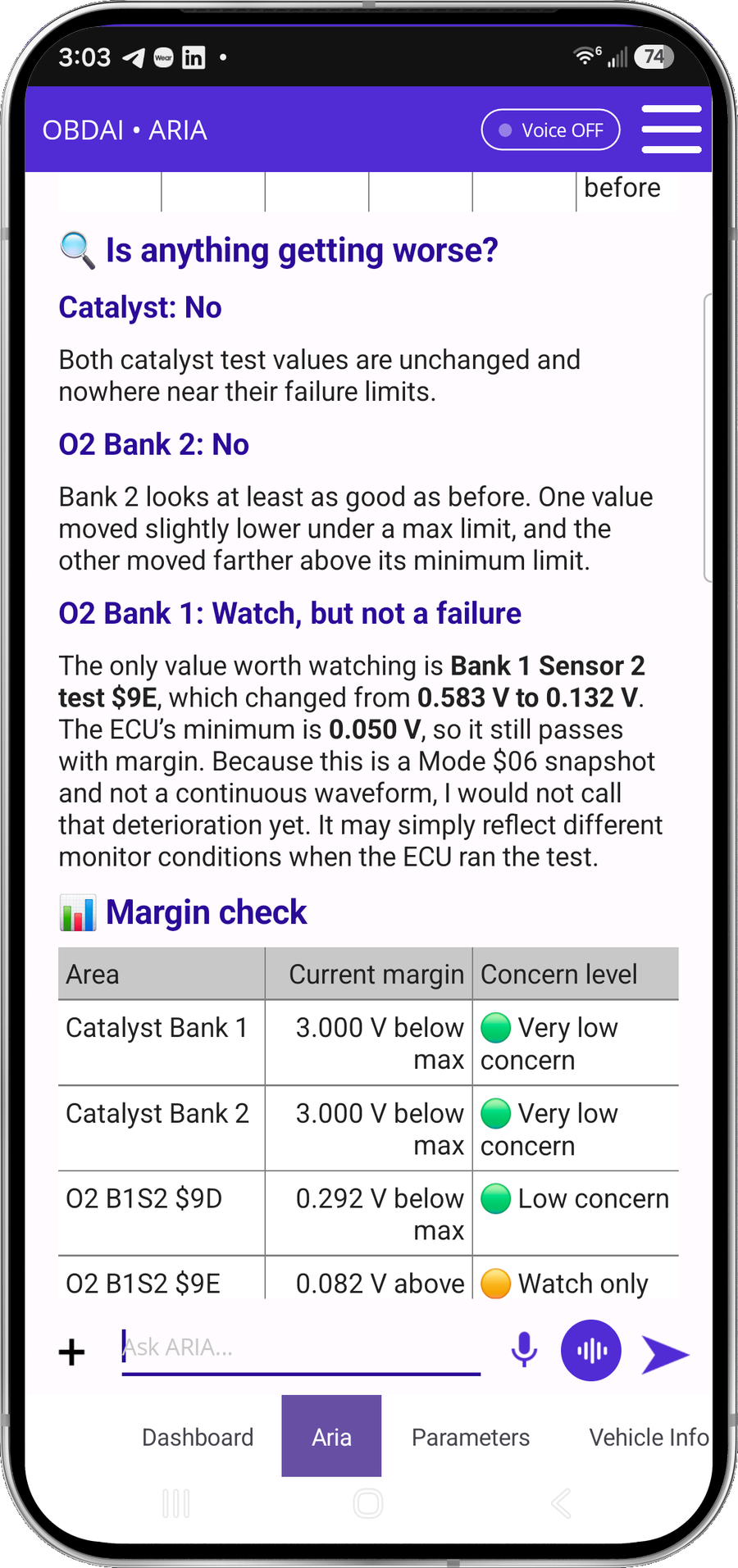
ARIA evaluates an oxygen sensor monitor change against the ECU minimum
ARIA · MODE 6 + HISTORY

A changed reading. A reasoned answer.

In this recorded example, ARIA compares 0.583 V with 0.132 V against a 0.050 V minimum. She explains the remaining margin and why a single monitor snapshot does not establish deterioration.

ARIA interprets load intake pressure temperature throttle and fuel trims together
ARIA · PARAMETER ANALYSIS

One reading gains meaning from the others.

ARIA considers coolant temperature, load, manifold pressure, throttle and fuel trims together. The explanation ties the measurements to the vehicle’s operating state.

ARIA combines historical monitor results fuel trim history and drive-cycle context
ARIA · HISTORICAL ANALYSIS

Give today’s results a history.

ARIA compares monitor trends with past fuel trims and drive-cycle context. In this example, she identifies a catalyst ratio worth watching while explaining that it remains below the failure threshold.

Shareable Premium report on laptop
SHAREABLE REPORTS

Keep the evidence together.

Turn the session into a clear OBDAI report you can download, share and review later with the vehicle history.

Freeze FrameMode 6
FULL J1979 EVIDENCE

Freeze Frame and Mode 6. Right where they belong.

See the vehicle at the moment the fault set, then check the monitor evidence manufacturers use to judge component performance.

  • Captured Freeze Frame events
  • Mode 6 monitor results and limits
  • Readiness, codes and live data together
Live parametersGauge dashboardReadiness
LIGHT + DARK · EVERYDAY TOOLS

Every screen earns its place.

Selectable parameter graphs, six fixed dashboard gauges, emissions readiness and complete parameter coverage—presented as the actual product, not caption art.

Included scanner hardware
THE HARDWARE

The best-value route to Premium.

The standard wireless GEN1 interface is included with the complete Premium software experience for supported vehicles.

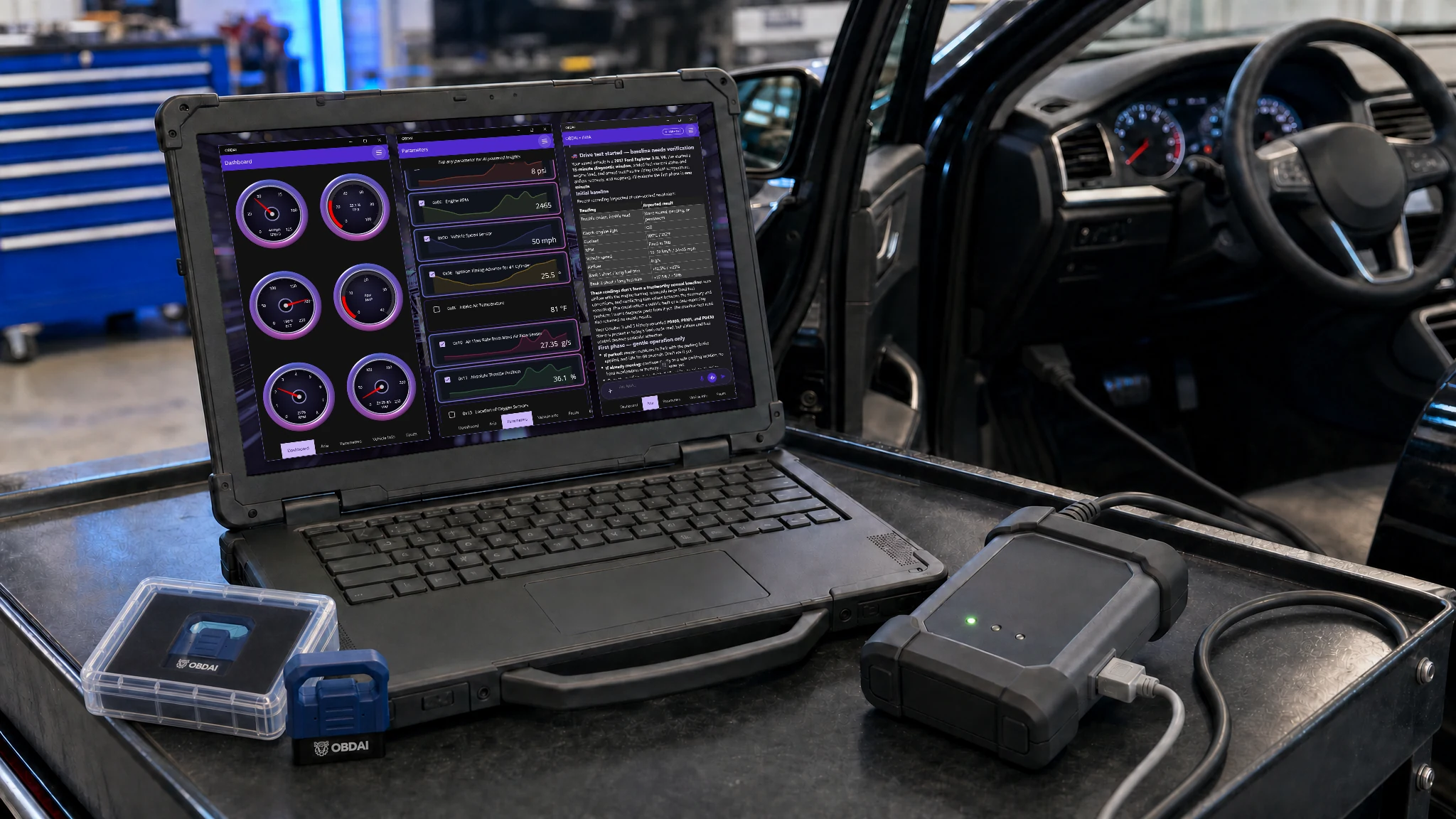
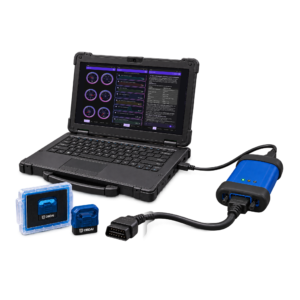
A technician's Windows laptop on a shop cart beside an open car door, showing OBDAI's live gauges over a J2534 pass-through interface cabled by USB to the laptop and to the car. VCI and PC not included.

OBDAI Ultra on Windows

Stop digging through menus. Ask for the whole car.

Autel, TOPDON, THINKCAR and MUCAR tablets make you drill down: make, model, year, system, module, data list. Then back out and do it again for the next module. Ultra puts ARIA on the J2534 VCI you already own, and you just ask.

The menu way
  • Diagnostics
  • Ford
  • Explorer
  • 2017
  • Body
  • BCM
  • Live data
  • Select items

Read it, back out, pick the next module, start over. Then figure out what it all means on your own.

The Ultra way

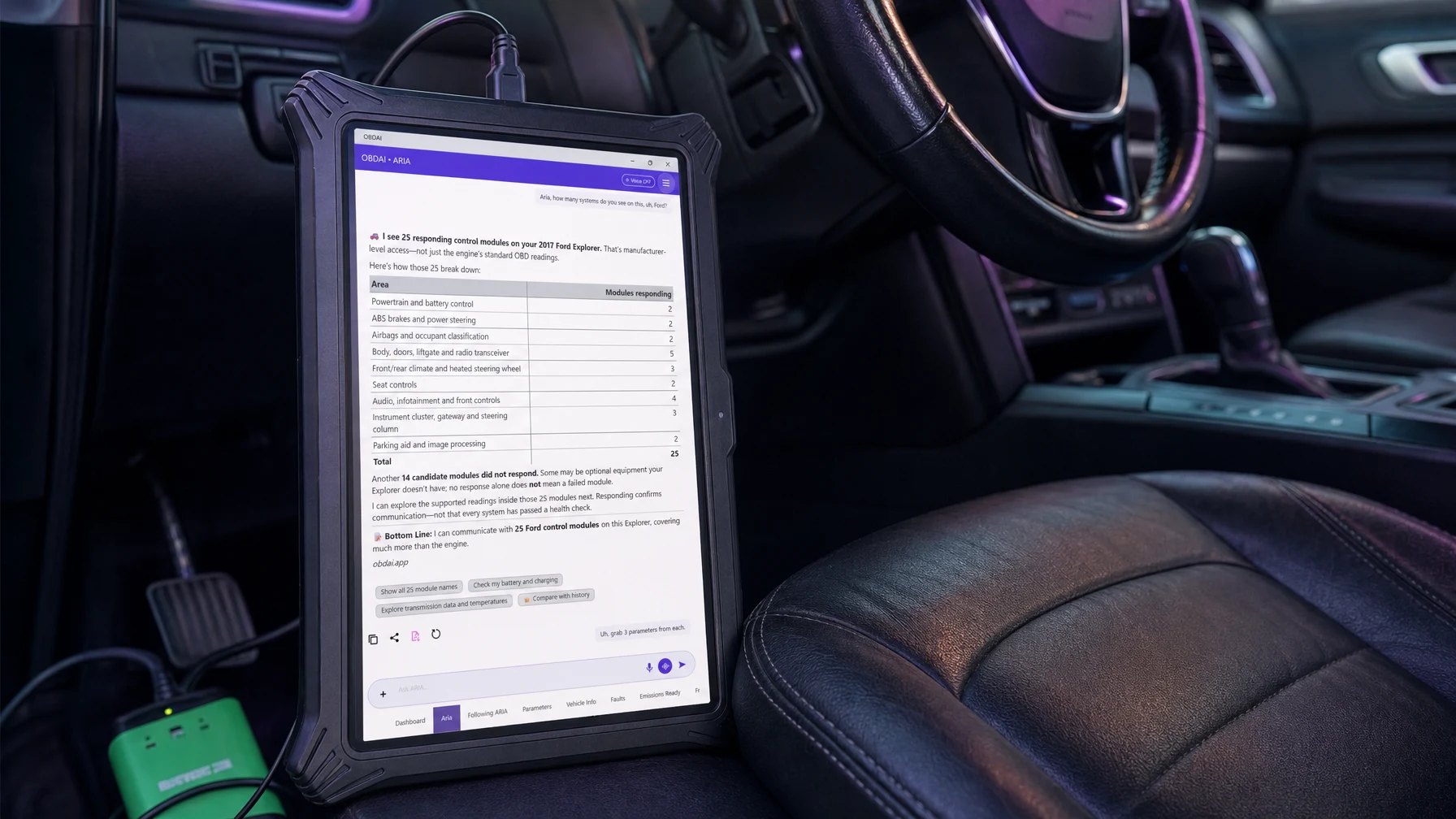
"Aria, how many systems do you see on this Ford?"

One question. ARIA finds the modules, pulls the readings and tells you what matters.

Example: one real session on a 2017 Ford Explorer with a Bosch VCI. Your numbers depend on the vehicle and your interface.

25control modules talking through J2534 on this Explorer
74manufacturer readings from all 25 modules off one request
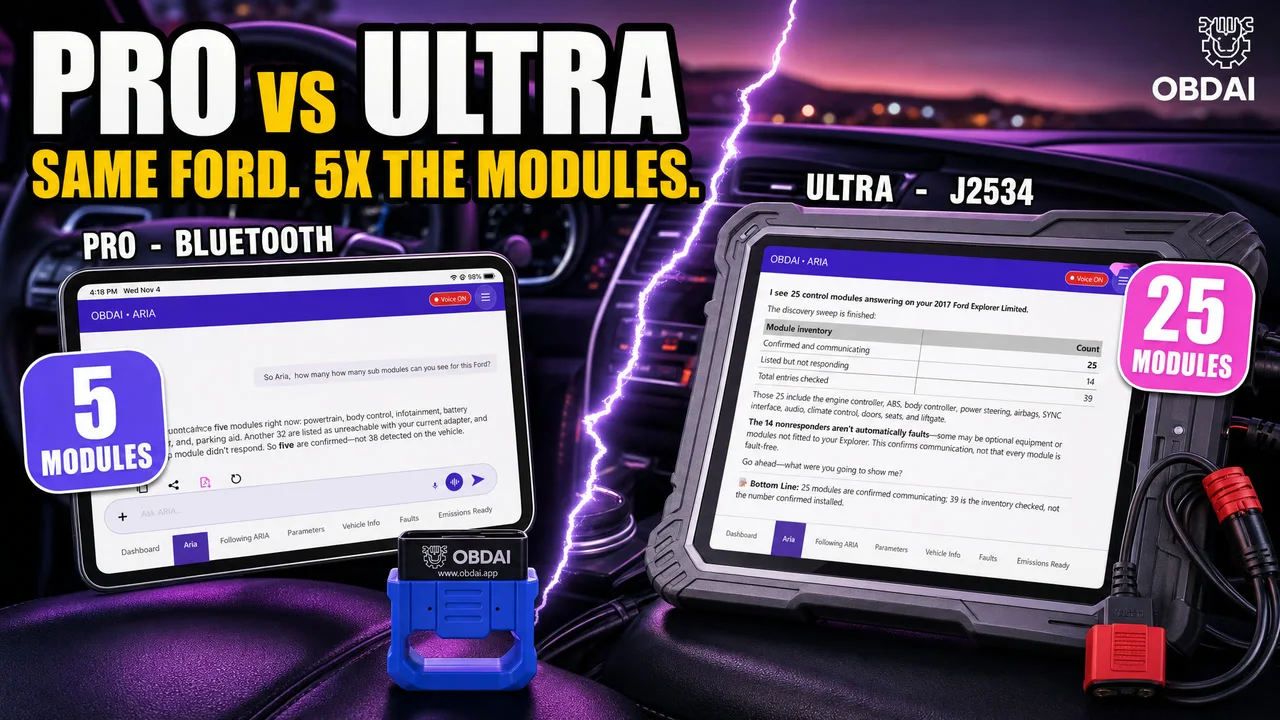
5×the modules Bluetooth GEN2 reached on the same truck: 25 vs 5
01 / ASK
Aria, how many systems do you see on this Ford?

ARIA sweeps the vehicle and comes back with 25 responding control modules, sorted by area: powertrain and battery, ABS and steering, airbags, body and doors, climate, seats, infotainment, cluster and parking aid.

She also tells you 14 more didn't answer, and that no answer doesn't mean a dead module. Some are options this truck doesn't have.

ARIA on Windows J2534 reporting 25 responding control modules on a 2017 Ford Explorer, broken down by area
Real ARIA screen from the 2017 Ford Explorer session.
02 / GRAB THE DATA
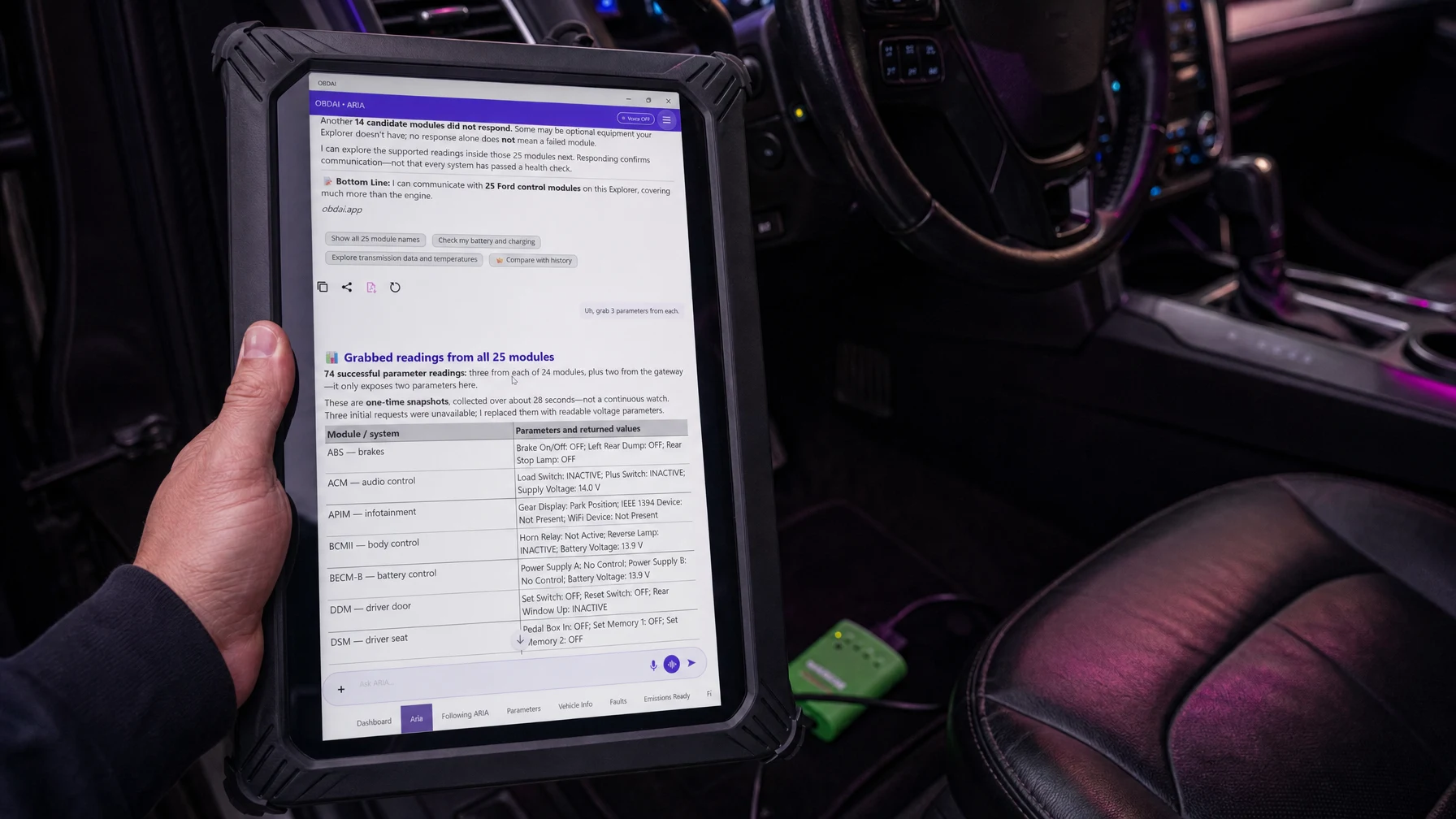
Grab 3 parameters from each.

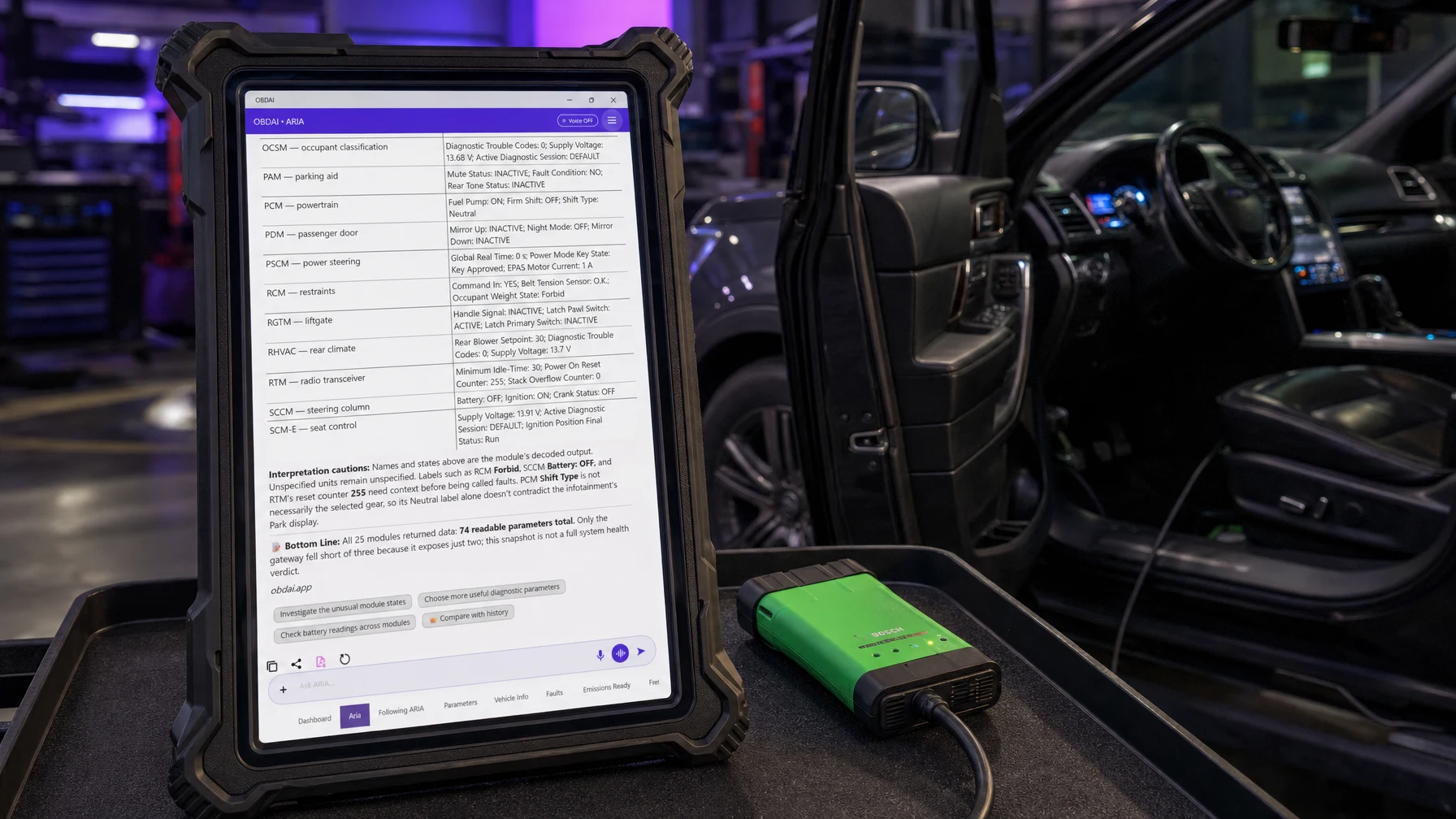
74 readings from all 25 modules in one answer. Brakes, doors, seats, liftgate, airbags, power steering, battery control, rear climate, radio. Three from every module, two from the gateway because that's all it exposes.

When three requests came back unavailable, she swapped in readable ones on her own. Nobody had to pick a single item from a list.

ARIA returning 74 manufacturer parameter readings from all 25 modules on a 2017 Ford Explorer
Same session, next question.
03 / FOLLOW ARIA

See exactly what she's reading.

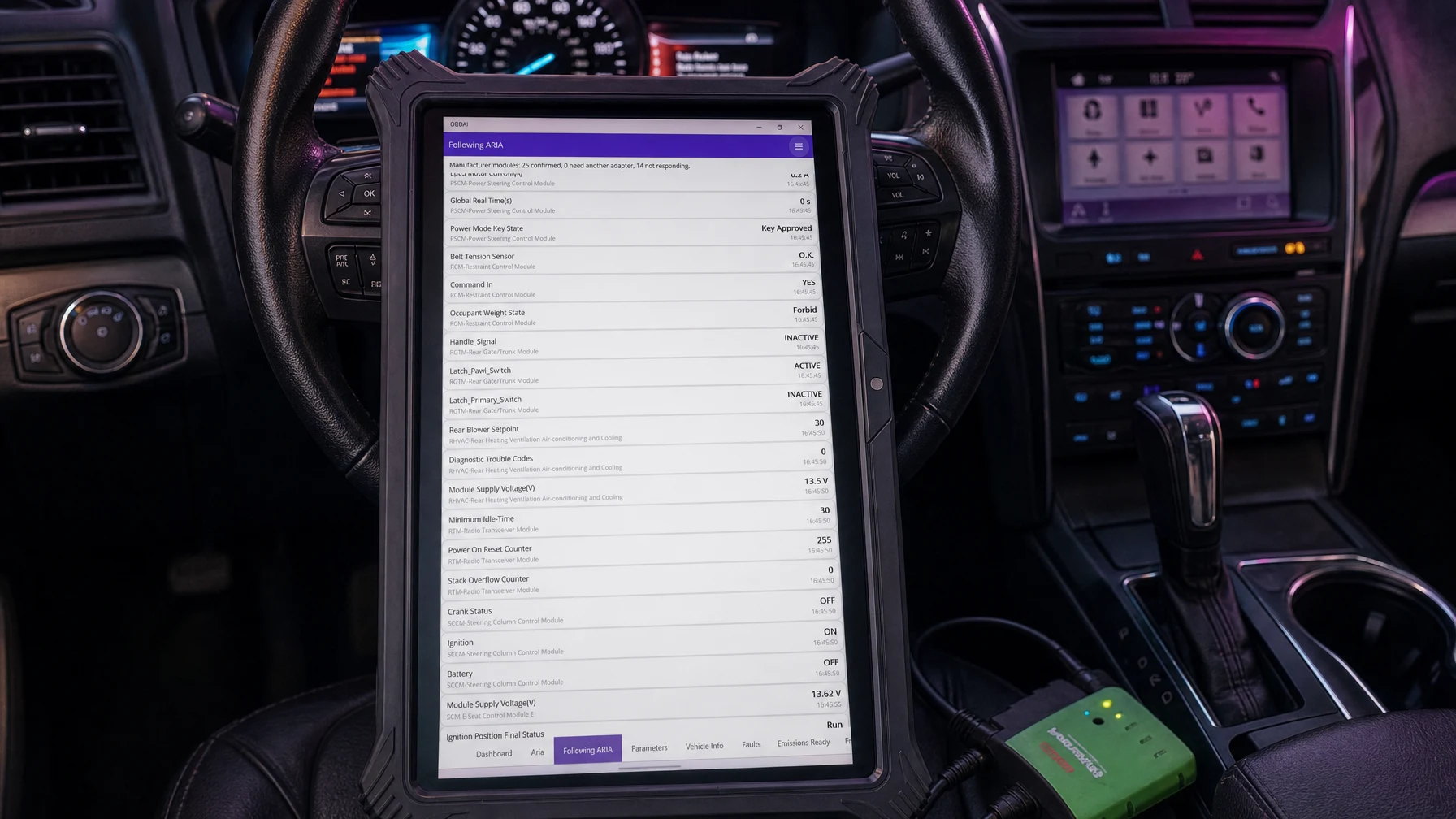
Every value ARIA pulls lands on the Following ARIA screen, labeled by module with a timestamp. Power steering key state, belt tension sensor, occupant weight, liftgate latch, rear blower, module voltages.

No black box. You watch the evidence come in, and it's saved with the session.

Following ARIA screen listing live manufacturer readings from power steering, restraint, liftgate, rear climate and radio modules
Following ARIA: 25 confirmed modules, readings by module.
04 / STRAIGHT ANSWERS

She tells you what not to over-read.

A scan tool hands you a wall of values and leaves you to guess. ARIA flags what needs context before anybody calls it a fault: an airbag occupant state of "Forbid", a radio reset counter at 255, a shift-type label that doesn't match the gear display.

That's the difference between data and a diagnosis.

ARIA flagging which module values need context before being called faults
ARIA's interpretation notes on the same 74 readings.
WATCH IT HAPPEN

PRO vs ULTRA: same Ford, 5× the modules

Same 2017 Explorer, same questions. The Bluetooth GEN2 that ships with every Ultra sees 5 modules. Plug in a J2534 VCI and ARIA sees 25, then pulls readings from every one of them.

More Ultra screens connection, gauges, codes, readiness, freeze frame
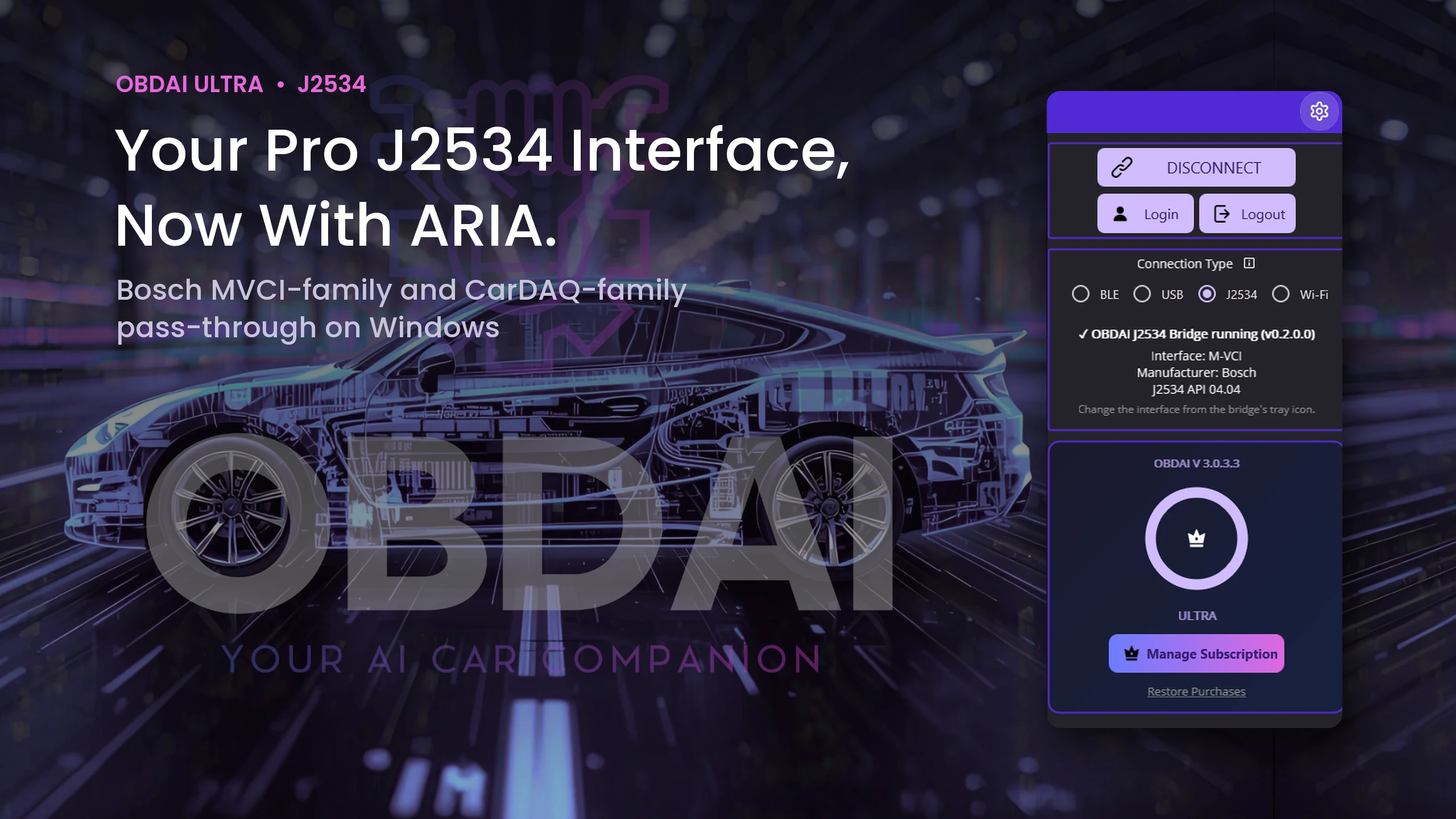
OBDAI on Windows connected through the OBDAI J2534 Bridge to a Bosch M-VCI interface, J2534 API 04.04, Ultra plan
Bridge running: Bosch M-VCI, API 04.04
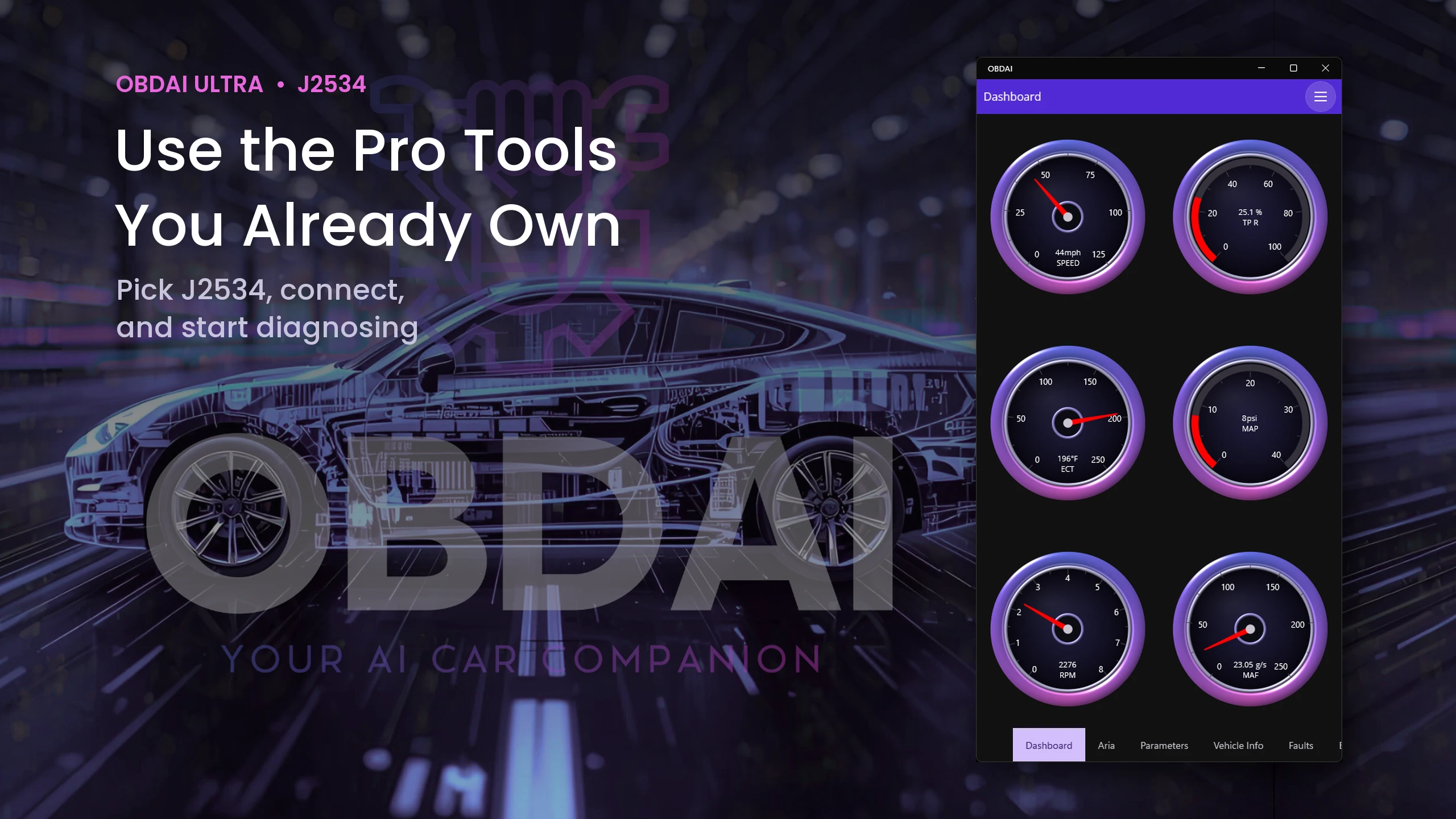
OBDAI live gauges for speed, throttle, coolant, MAP, RPM and MAF over J2534
Live gauges
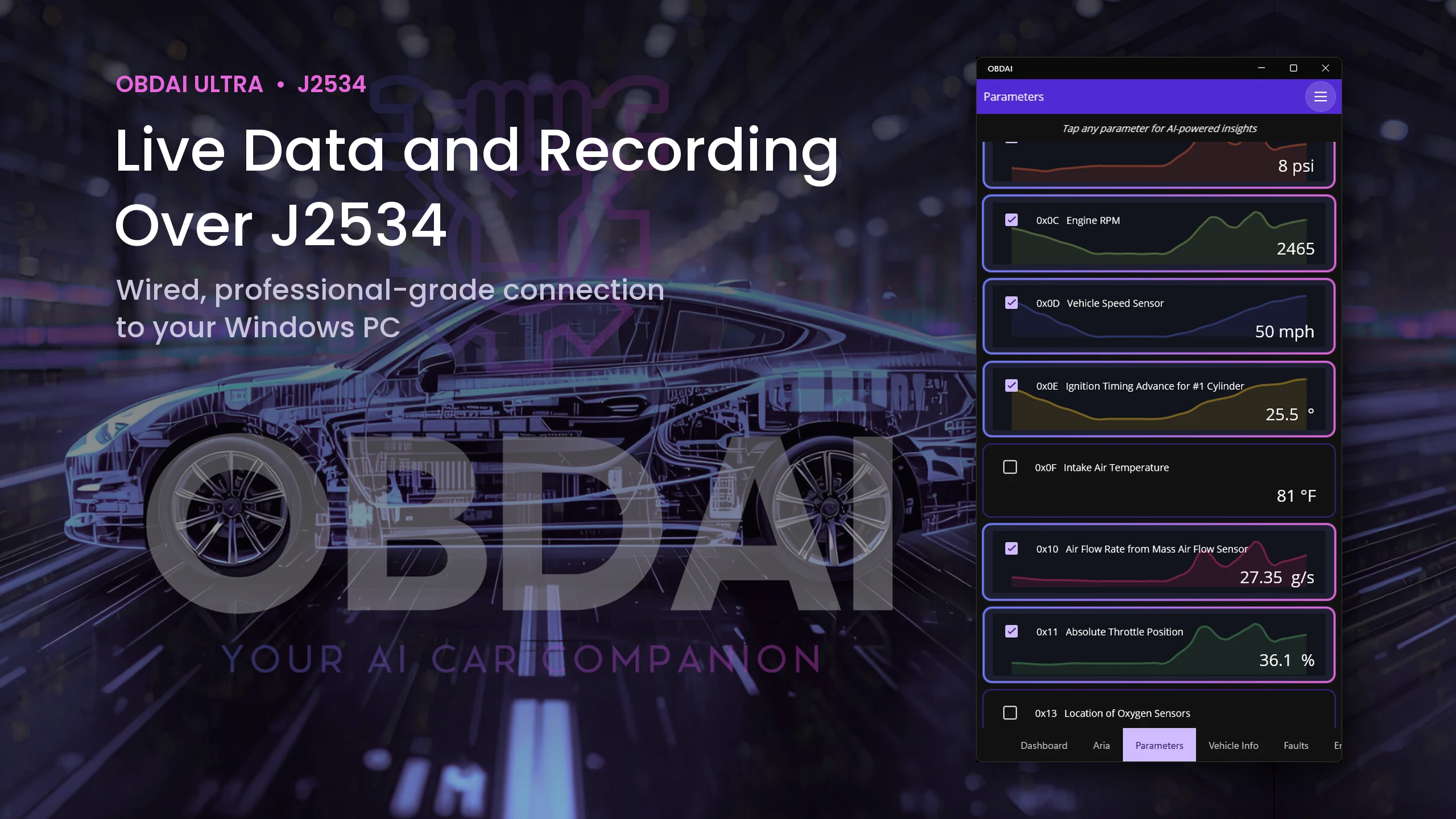
OBDAI live parameter graphs for RPM, speed, timing, MAF and throttle over J2534
Live parameter graphs
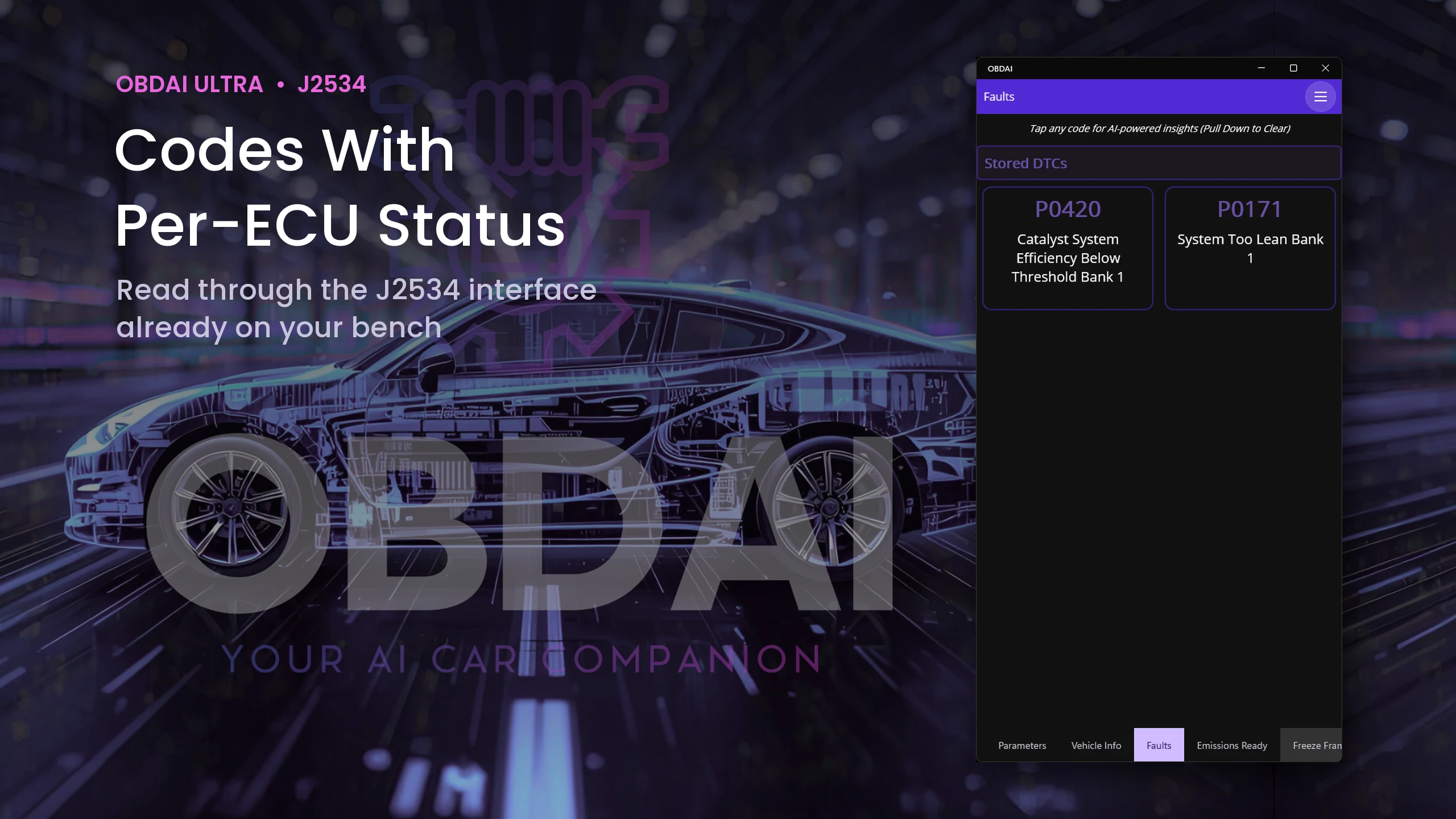
OBDAI fault list showing stored P0420 and P0171 read over J2534
Stored codes
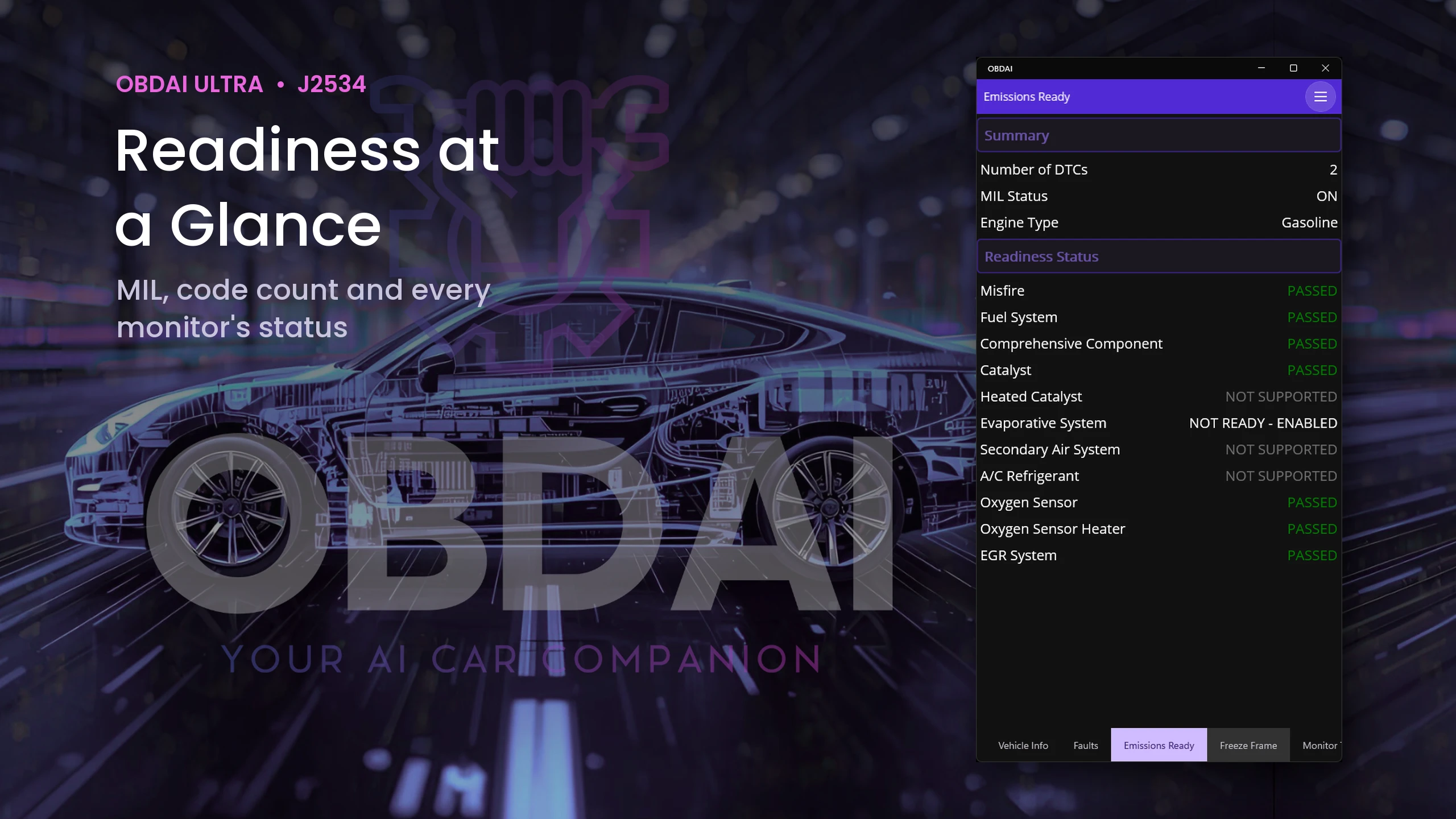
OBDAI emissions readiness: MIL on, two codes, evaporative system not ready
Emissions readiness
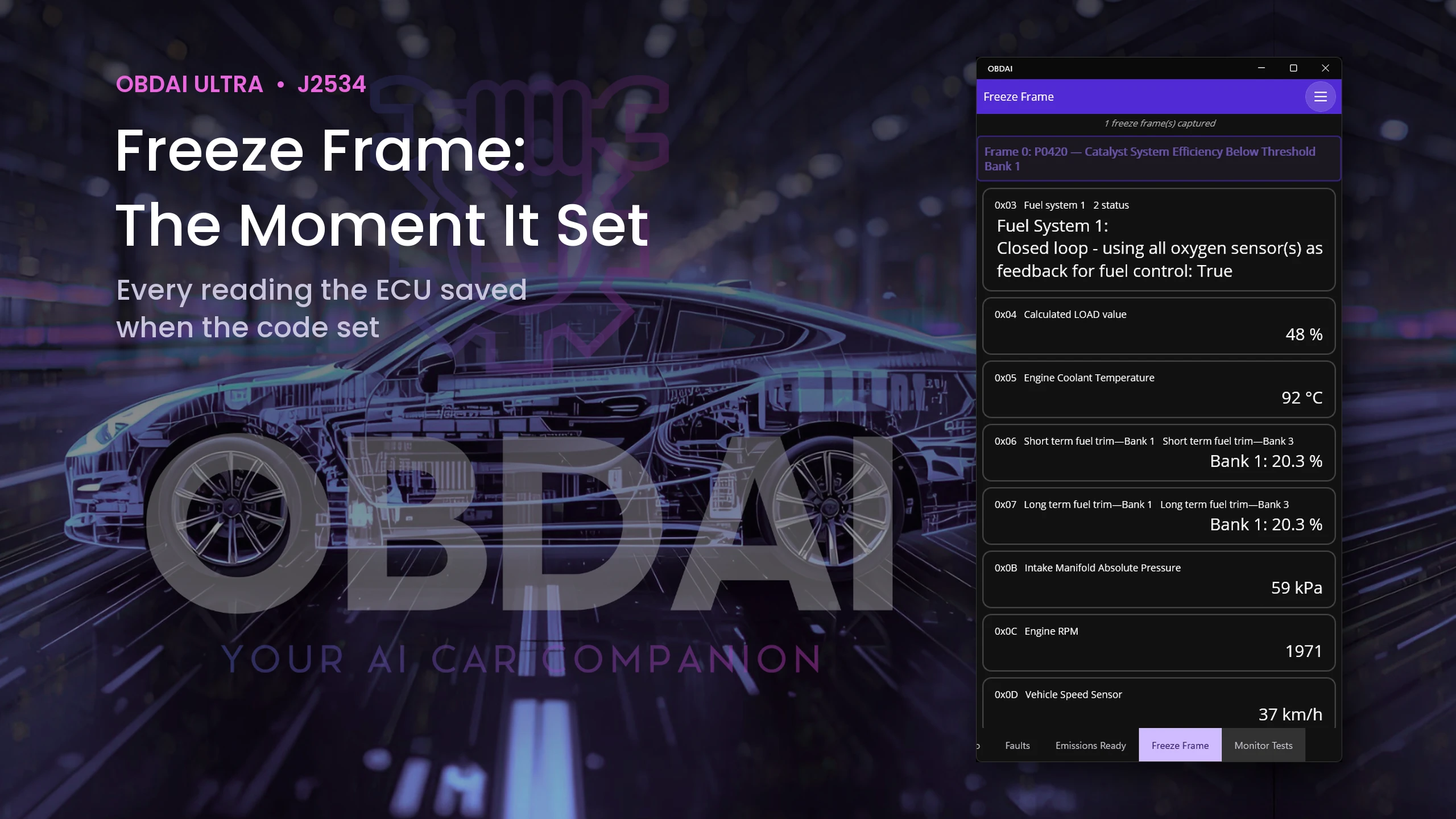
OBDAI freeze frame stored with P0420, with fuel trims, load, RPM and speed
Freeze frame
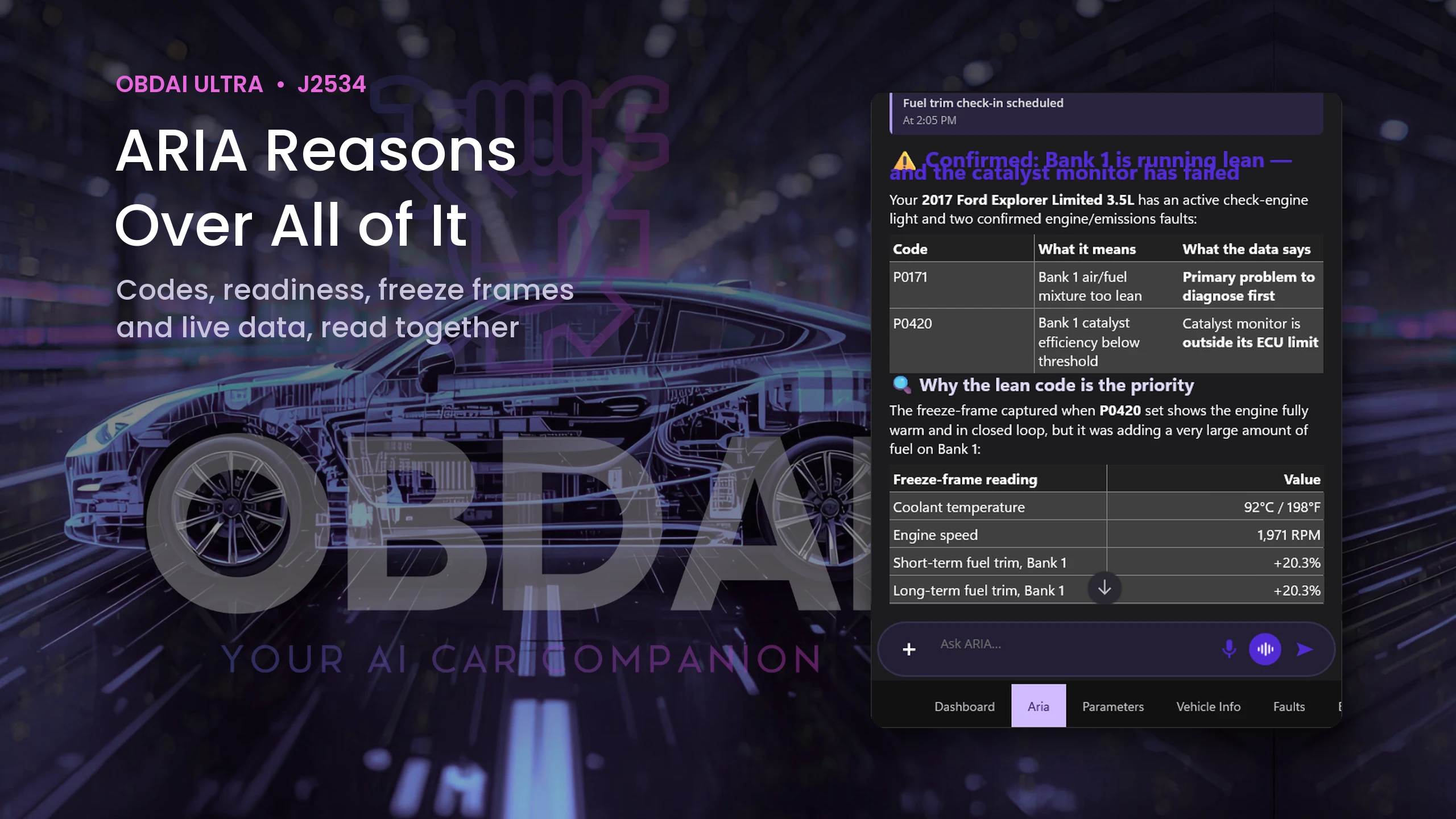
ARIA explaining that Bank 1 is running lean and the catalyst monitor has failed
ARIA's diagnosis
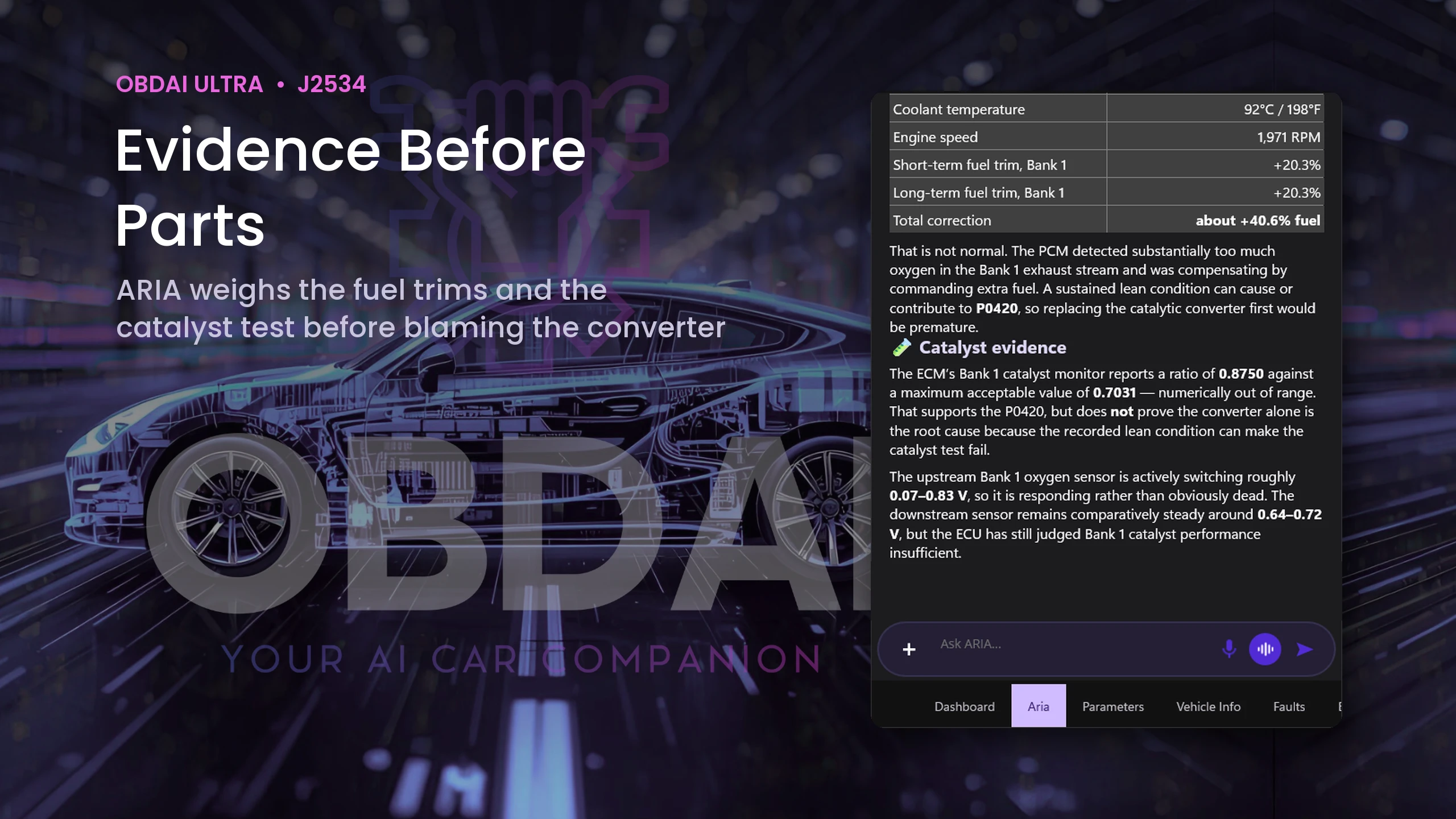
ARIA weighing the freeze-frame fuel trims and the catalyst test before blaming the converter
ARIA's evidence
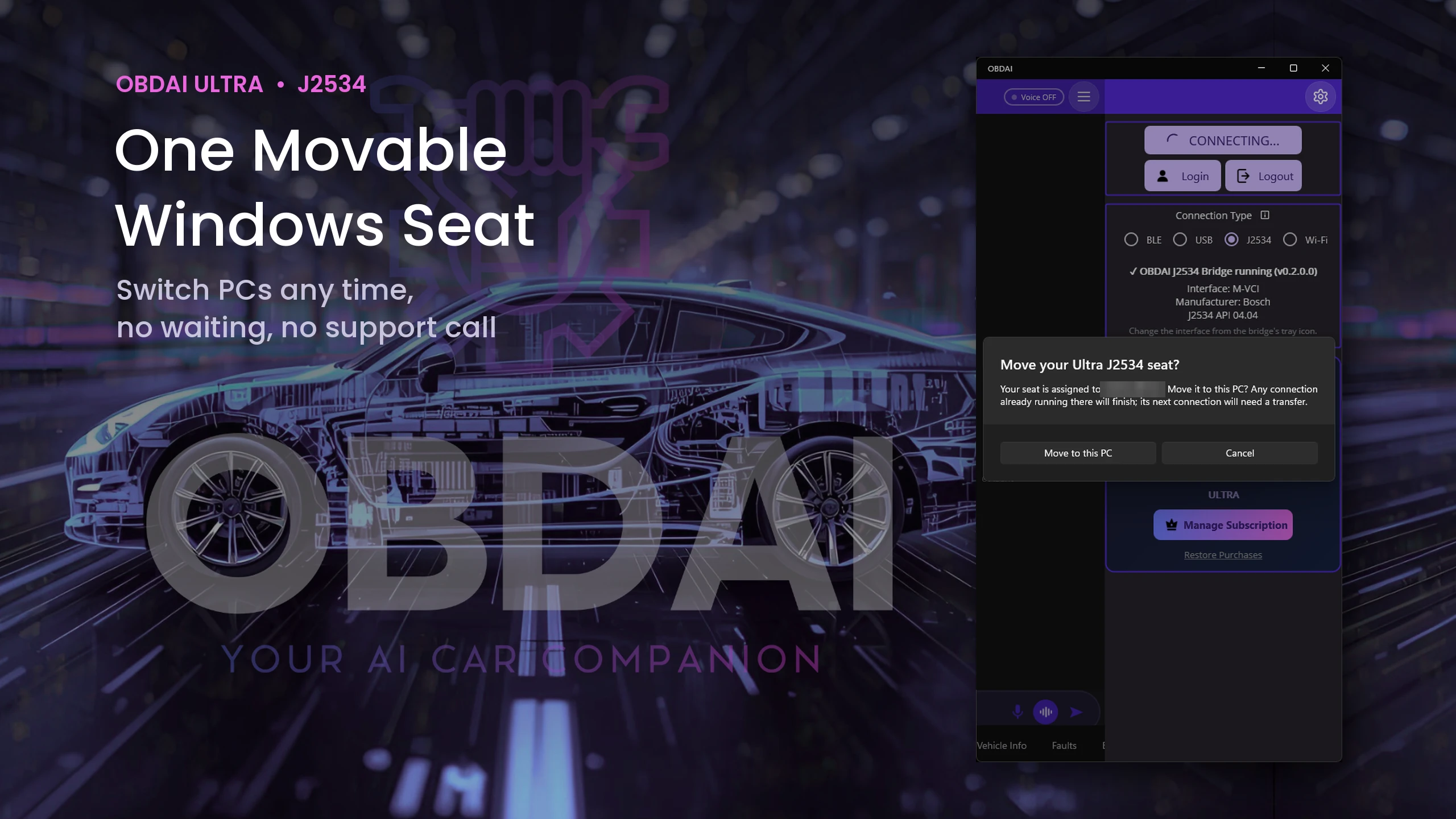
OBDAI prompt to move the Ultra J2534 seat to this PC
Moving the seat to this PC

Modules and readings vary by vehicle, interface and supported systems. Device scenes are illustrations; every screen shown is a real OBDAI screen from a 2017 Ford Explorer session on November 4, 2026. Use your Windows J2534-compatible interface with its manufacturer's driver. The VCI and Windows PC are not included; the GEN2 wireless adapter is.

What you plug in: the VCI you already own

OBDAI Ultra works with Windows J2534-compatible interfaces. OBDAI implements the J2534 04.04 and 05.00 standards, so compatibility extends across manufacturers. Common interfaces include the devices below.

Compatible Windows J2534 interfaces
Brand or familyLook for your interface
Bosch / OTCMastertech M-VCI / Mastertech VCI; Mastertech II / MTECH2; Bosch Flasher Pro; MTS 6531; GVCI-MX / MTS 6534; MTS 6512, 6513, 6516 and 6517; ADS-series VCI; OTC Evolve VCI
General MotorsGM MDI; GM MDI 2 / EL-52100
FordVCM II / VCM2; VCM 3 / VCM III; VCMM
Honda / AcuraBosch MVCI; DENSO DST-i; DST-nano; Antares Capsule / HAC
CarDAQ / Drew Technologies / Opus IVSCarDAQ-Plus; CarDAQ-M / Mega-CAN; CarDAQ-Plus 2; CarDAQ-Plus 3; CarDAQ Pro; SuperGoose-Plus; DrewLinQ
Mongoose / Toyota Techstream LiteMongoose ISO/CAN; MongoosePro Chrysler, Ford, GM2, Honda, Jaguar/Land Rover, Nissan, Toyota2 and VW/Audi; Mongoose-Plus Ford2, GM3, Honda2, Subaru, Nissan2, VW/Audi, ISO/CAN3 and Chrysler2; Mongoose-Plus MFC / MFC3 / Toyota3; MongoosePro MFC2; Toyota Techstream Lite with its Mongoose interface
Snap-onPass Thru Pro II; Pass Thru Pro III; Pass Thru Pro IV / EETA113D
MatcoMDMaxBox / MDMAXBOX; MaxSync
DENSODST-i; DST-nano; DST-010 / DN-DST-010 variants for Toyota, Honda, Daihatsu, Subaru, Mazda and Hino
DG / AutoEnginuity / CardoneVSI-2534 / VSI-J2534; VSI NxGen; VSI NxGen PLUS; d-briDGe; d-briDGe PRO; PX3; Cardone FLASH2
AutelMaxiFlash Pro; MaxiFlash Elite; JVCI; JVCI+; VCI; VCMI; VCMI2; XLink
LAUNCHJ-Box2; SmartLink C; SmartLink C V2.0; SmartLink C V3.0
TOPDONRLink J2534; RLink Lite; RLink X7; RLink X3; Phoenix MDCI Pro
THINKCAR / XTOOLTHINKCAR ThinkLink; MUCAR 892BT PRO VCI; XTOOL XVCI MAX / J2534X; XPortal
Scanmatik / TactrixScanmatik SM2; SM2-PRO; SM3; Tactrix Openport 2.0
ACTIA / Controller TechnologiesACTIA PassThru+ XS 2G / XS2G; CTC Pulsar; UCAN; UCAN2; VehicleBox; DRB+

Install your interface manufacturer’s Windows J2534 driver, then select J2534 in OBDAI.

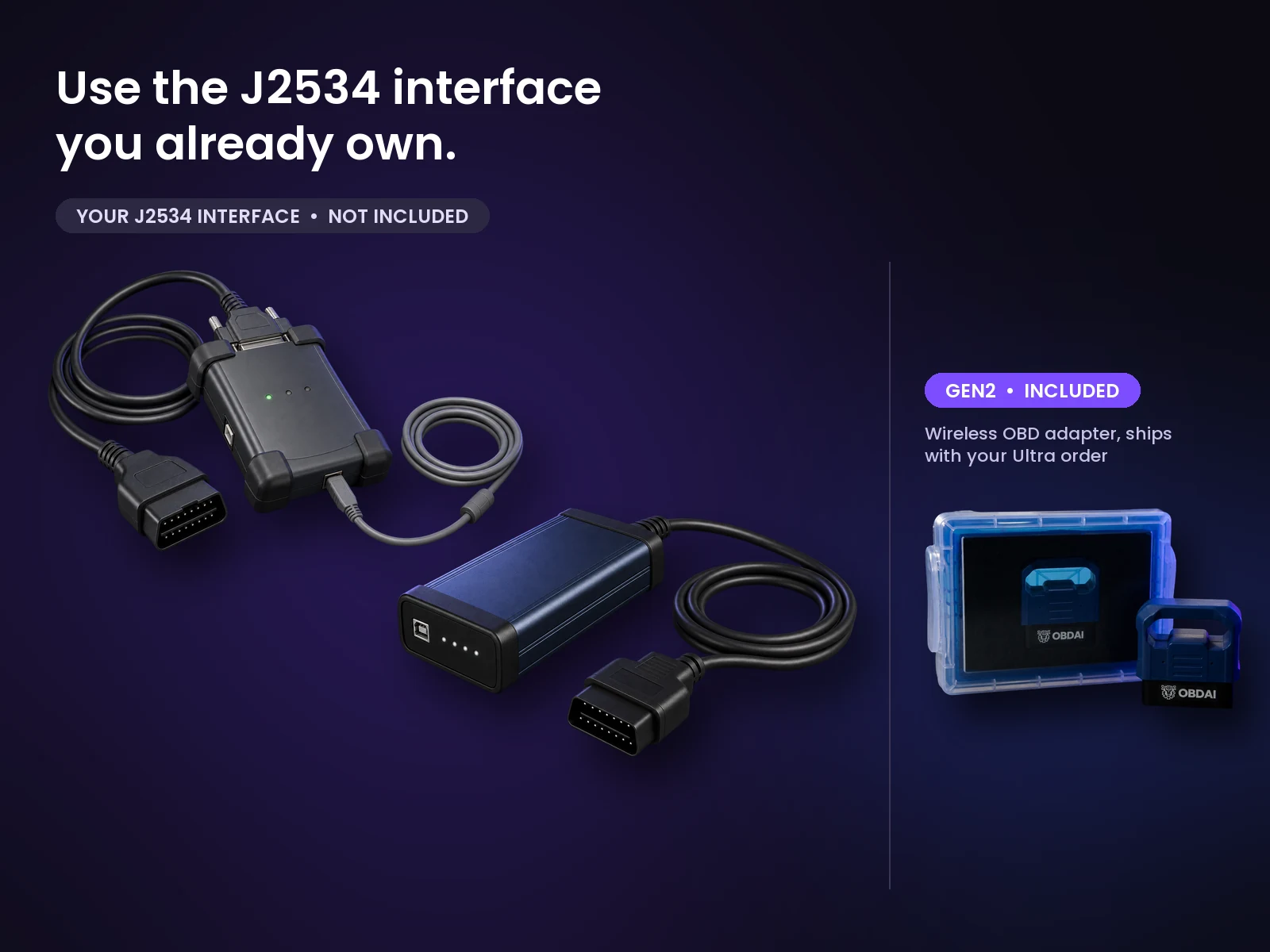
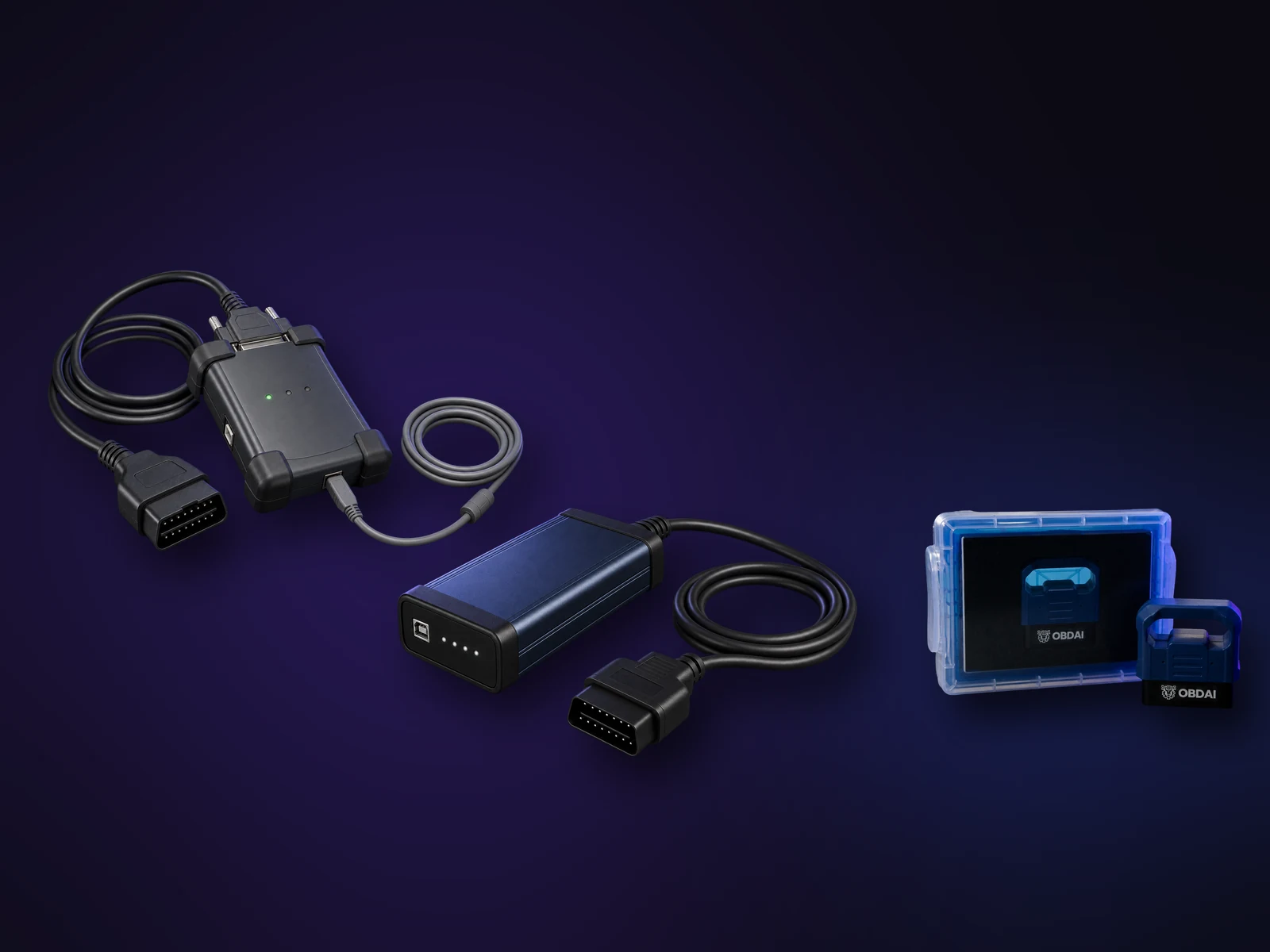
Two examples of professional J2534 pass-through interfaces a shop may already own (not included), next to the OBDAI GEN2 wireless adapter and case that ship with Ultra.
Your VCI: not included. GEN2 wireless adapter: included.

What ARIA does with your interface

  • Diagnostic coverage: ARIA investigates supported vehicle systems using standard OBD-II, OBDonUDS and manufacturer-specific data through your Windows J2534 interface. Available systems and readings depend on the vehicle and your interface’s capabilities.
  • Live data: ARIA chooses relevant readings, watches how they change and uses the recorded drive or bay test to investigate the symptom.
  • Trouble codes: ARIA reads stored, pending and permanent codes, then examines available freeze-frame conditions to understand what was happening when the fault set.
  • Readiness and Mode 6: ARIA checks monitor status and measured test results against the vehicle’s reported limits to distinguish a completed test from a passing one.
  • Vehicle information: ARIA uses the vehicle’s identity to put the findings in context. OBDAI saves the VIN with the session.
  • ARIA reads the evidence: She connects codes, live readings and test results to explain what they mean together and guide your next test.
  • Saved automatically: OBDAI uploads the session to your account so you can return to the evidence and work with ARIA in the Pro dashboard to build a report or repair estimate.

Setup help. Contact support@obdai.app for OBDAI setup help. Get VCI drivers and firmware updates from your interface manufacturer.

Up and running in minutes

Your license key arrives with your order confirmation, so you can start on your own interface the same day. Your GEN2 ships separately.

  1. Install. Install your interface manufacturer's Windows driver (links in the table above) and the official OBDAI app from the Microsoft Store, version 3.0.4 or later. If Windows shows an older version, update OBDAI in the Microsoft Store first.
  2. Activate. Sign in to the OBDAI account you will use, open the menu, choose Upgrade, then "Yes, I have a code", and enter your license key.
  3. Connect. Choose J2534 on the connect panel, pick your interface from the OBDAI J2534 Bridge tray icon in the Windows taskbar (it may be under the ^ hidden icons), plug into the vehicle and start recording.

GEN2 included. Wireless when you leave the bench.

Ultra ships the OBD BLE GEN2 for phone, tablet and road tests. Your VCI handles the Windows bench work. Use the GEN2 with the OBDAI app on iPhone, iPad, Android or Windows under the same account.

Everything in Pro is included

Ultra is not an add-on. It includes OBDAI Pro, so you keep the full Pro workflow on every device signed in to your account: ARIA diagnostics, condition watches and check-ins, the Pro dashboard, report builder with shop branding, saved reports and PDF downloads, freeze frame and Mode 6 review, and OBDonUDS on the GEN2.

See what ARIA makes of the evidence.

Real analysis from recorded vehicle sessions.

01 / ANALYZE

Understand the relationships

ARIA connects monitor results, operating conditions and parameter behavior.
02 / COMPARE

Put changes in context

Compare sessions and check the distance from the ECU’s reported limits.

03 / EXPLAIN

Make the findings useful

Keep the analysis with the vehicle and share a clear report.

ARIA evaluates an oxygen sensor monitor change against the ECU minimum
ARIA · MODE 6 + HISTORY

A changed reading. A reasoned answer.

In this recorded example, ARIA compares 0.583 V with 0.132 V against a 0.050 V minimum. She explains the remaining margin and why a single monitor snapshot does not establish deterioration.

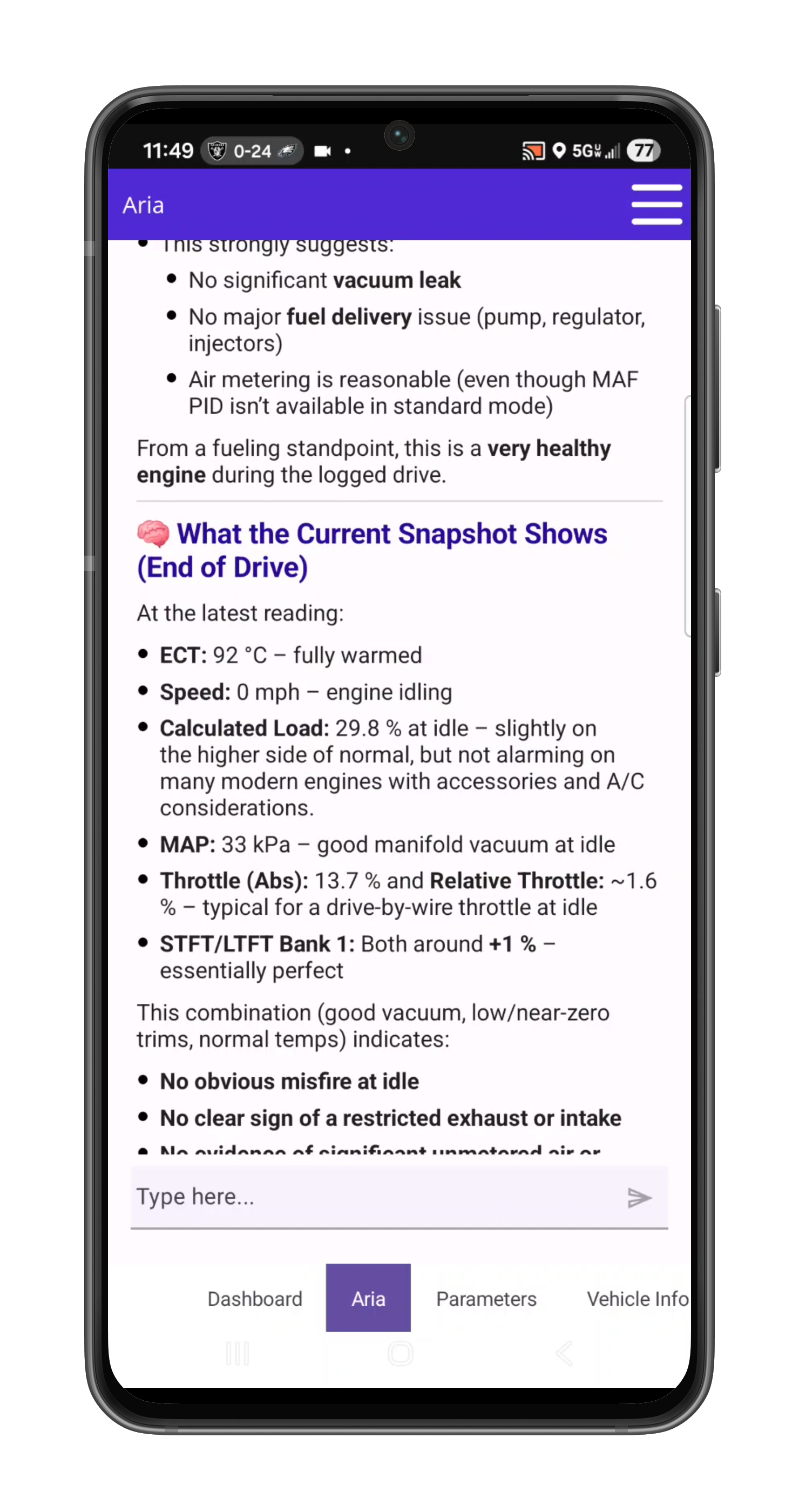
ARIA interprets load intake pressure temperature throttle and fuel trims together
ARIA · PARAMETER ANALYSIS

One reading gains meaning from the others.

ARIA considers coolant temperature, load, manifold pressure, throttle and fuel trims together. The explanation ties the measurements to the vehicle’s operating state.

ARIA combines historical monitor results fuel trim history and drive-cycle context
ARIA · HISTORICAL ANALYSIS

Give today’s results a history.

ARIA compares monitor trends with past fuel trims and drive-cycle context. In this example, she identifies a catalyst ratio worth watching while explaining that it remains below the failure threshold.

PRO Diagnostic Report builder on laptopSaved PRO diagnostic report viewer on laptop
PRO · REPORT BUILDER + SAVED REPORTS

Build it. Save it. Show the customer.

Continue the analysis with interactive ARIA Web Chat, choose the source session and turn the findings into an editable, shop-branded report with repair and maintenance context.

  • Unlimited editable reports with custom shop branding
  • Repair estimates and maintenance recommendations
  • Market, auction, repair and sales-history context
Ultra / What you get

Bring ARIA into your Windows J2534 workflow

Everything in Pro, with a licensed Windows J2534 connection. Use the interface you already own in the bay, and the included GEN2 for wireless work.

Ultra capability sheet
CapabilityWhat you can do
Everything in ProUse Pro’s estimates, reports, on-request research and ARIA workflow across your account devices.
Windows J2534 accessIncludes one transferable Windows J2534 seat. Check interface requirements →
Manufacturer-specific dataARIA goes past the engine computer into modules like body control, brakes, airbags, power steering, parking aid, trailer brake, transfer case, climate, seats and EV battery. Available modules and readings vary by vehicle and adapter type.
OBD-II — J1979-1 & J1979-2 (OBDonUDS)Check supported fault codes, live data, freeze frame, Mode 6 and readiness. Includes OBDonUDS through GEN2 or Windows J2534.
Keep the evidence togetherBring recorded standard OBD-II data into the diagnostic review.
Finish the customer workTurn the session into a shop-branded repair estimate, diagnostic, emissions or pre-purchase report.
Work offline where supportedWindows diagnostics can work offline after activation. ARIA and cloud services require internet.
GEN2 is included tooThe first-year bundle includes a shipped GEN2 adapter.

Use a compatible Windows J2534 interface and its manufacturer’s driver. The VCI, Windows PC and manufacturer software or subscriptions are not included. Factory-information research runs on request in ARIA chat.

Emissions reports are pre-check documents, not official inspection certificates.

Premium / Pro / Ultra

Choose the workflow your next job needs

Every plan puts ARIA in charge of the scan tool: tell her the symptom, talk or send a photo, and let her choose readings, schedule check-ins and watch for changes. She reviews the recorded drive second by second and remembers the vehicle. Choose the tools you need to turn that evidence into your next step.

Premium, Pro and Ultra — capabilities at a glance
What you needPremiumProUltra
Best fitFind the next test before buying partsDiagnose, price and document shop workThe Pro workflow through Windows J2534
Standard OBD-II data — SAE J1979-1IncludedIncludedIncluded
OBDonUDS — SAE J1979-2Not included todayWith GEN2With GEN2 or Windows J2534
Browser workflowHistory with website purchasesInteractive ARIA and report builderAll Pro web tools
Repair estimatesNot includedParts and labor, price choices and a signature lineAll Pro estimate tools
Report workflowApp PDF exportDiagnostic, repair, emissions and pre-purchase reportsAll Pro report types
Factory information researchNot includedOn request in ARIA chatOn request in ARIA chat
Windows J2534Not includedNot includedOne transferable Windows seat
PremiumView capabilities
Premium capabilities
What you needPremium
Best fitFind the next test before buying parts
Standard OBD-II data — SAE J1979-1Included
OBDonUDS — SAE J1979-2Not included today
Browser workflowHistory with website purchases
Repair estimatesNot included
Report workflowApp PDF export
Factory information researchNot included
Windows J2534Not included
ProView capabilities
Pro capabilities
What you needPro
Best fitDiagnose, price and document shop work
Standard OBD-II data — SAE J1979-1Included
OBDonUDS — SAE J1979-2With GEN2
Browser workflowInteractive ARIA and report builder
Repair estimatesParts and labor, price choices and a signature line
Report workflowDiagnostic, repair, emissions and pre-purchase reports
Factory information researchOn request in ARIA chat
Windows J2534Not included
UltraThis plan
Ultra capabilities
What you needUltra
Best fitThe Pro workflow through Windows J2534
Standard OBD-II data — SAE J1979-1Included
OBDonUDS — SAE J1979-2With GEN2 or Windows J2534
Browser workflowAll Pro web tools
Repair estimatesAll Pro estimate tools
Report workflowAll Pro report types
Factory information researchOn request in ARIA chat
Windows J2534One transferable Windows seat

Every first-year bundle includes a shipped GEN2 adapter. Renewal is service only. Prices, renewals and allowances are shown in the purchase summary.

Premium browser history is included with website purchases; app-store Premium does not include dashboard access. Pro and Ultra add interactive ARIA Web Chat and web report tools.

Also included

  • ARIA deep research10 completed research jobs per month (Pro includes 3): ARIA reads factory and primary service sources and returns a cited report.
  • Room for a bigger plan10 active watches and check-ins combined (Pro: 5).
  • More automatic follow-ups40 per connected session and 600 per account each month (Pro: 20 and 300).

Monthly allowances reset at the start of each calendar month (UTC), do not roll over and have no automatic paid overage. Existing purchased terms remain protected.

What's included and what's not

OBDAI Ultra — $399 first year, then $365/year service only
Included Not included
  • Windows J2534 connection: one transferable Windows seat per account
  • Everything in OBDAI Pro, on every device signed in to your account
  • One OBD BLE GEN2 wireless adapter, shipped
  • First year of service; renews at $365/year without replacement hardware
  • J2534 VCI (use the one you own)
  • Windows PC
  • Phone or tablet
  • Manufacturer drivers for your interface (free from the manufacturer)

Shipping and tax, if applicable, are shown separately at checkout.

Your questions, answered

Buying & setup

Your subscription starts and charges when you buy. Activating or redeeming later gives you the remaining purchased term; it does not start another year or move your renewal date. Find the actual paid-through and renewal dates in My Account subscriptions.

No. The new bundle includes a shipped GEN2 initially. Ultra renews at $365/year for service only, without replacement hardware. Pro service renewal remains $265/year. Shipping and tax, if applicable, are shown separately at checkout.

Open My Account orders and the paid order details. Sign in to the intended OBDAI account before redeeming the license. Digital access and the GEN2 shipment are separate; you do not need to wait for the scanner delivery to begin with supported equipment. For an unresolved paid order, contact support@obdai.app.

Use My Account subscriptions to manage renewal and view its current status and paid-through date. Contact support for a refund request under the applicable purchase terms.

U.S. orders: Ship within 1–2 business days. Delivery typically takes 3–5 business days via USPS.

International orders: Ship within 1–2 business days. Delivery typically takes 7–14 business days depending on destination. Tracking is provided.

Import duties, VAT, and customs fees (if any) are the customer's responsibility.

Direct orders (obdai.app/shop): 30-day return window. Hardware includes a 1-year limited warranty.

Amazon orders: Follow Amazon's return policy.

Full policy details →

If you purchased from Amazon, visit obdai.app/amazon-quickstart to download the app and activate your license. If you purchased from our shop, visit obdai.app/quickstart. Both pages walk you through downloading OBDAI, redeeming your license code, and connecting to your vehicle.

Using Pro

One optional ARIA review started by a due check-in or condition watch. Several events reviewed together count as one follow-up; internal tools, searches and connection retries are not separate follow-ups. A review that starts processing spends one allowance even if its answer later fails. A request refused before processing spends none. Built-in check-engine-light and new-stored-code alerts do not spend the optional allowance.

Monthly allowances, including research jobs, reset at the start of each calendar month (UTC). They are shared across sessions, vehicles and devices. Unused allowance does not roll over, and there is no automatic paid overage. Upgrading changes the allowance without refilling usage.

ARIA can schedule check-ins or watch for a reading to meet a condition. A watch uses fresh readings and a confirmed change. ARIA helps you evaluate the evidence; it does not repair the vehicle for you.

Quick search returns a few short results inside normal ARIA questions. Deep research is a separate job: ask ARIA in chat with the vehicle details and any readings you want checked, and agree when she offers to research the question. ARIA searches, opens and reads factory service sources, then returns a cited report: what she found, where it came from and what to confirm at the car. It does not read your recorded session on its own, so put the readings in the question. Pro includes 3 completed research jobs per month and Ultra includes 10, one job at a time per account. A job that fails or returns no cited report does not count. A report can explain conflicting or missing evidence; it cannot guarantee a pinout, procedure or repair result.

OBDAI Ultra adds a supported Windows J2534 connection and 10 deep-research jobs per month to Pro. Use Upgrade or Downgrade on the applicable subscription in My Account. Woo checkout shows your actual credit, amount due and renewal date. It switches the existing software subscription, with no second GEN2 or second recurring subscription. Store purchases follow their own channel rules; contact support before making a second purchase.

Yes. PRO includes a shop profile where you set your business name, logo, phone number, email, and address. Every report you generate carries your branding automatically.

Configure your shop profile in the web dashboard under Settings after activating your PRO license.

After activating PRO, sign in at dashboard.obdai.app with the same account you use in the OBDAI app. The dashboard works in any modern browser — no installation required.

You can view vehicles, review scan sessions, generate reports, and edit them with the AI report editor — all from your desk.

Testimonials

“Great tool! Just like other tools you have to guide the process for the program to assist you.”
Hostile Auto Repair · Apple App Store
“App is well thought out, graphically pleasing, and easy to use by non-automotively inclined users. I recommend this app for all cars.”
Bryan Stewart · Google Play
“The instructions are crystal clear, and you don’t need to be a pro to figure it out.”
“Know Your Car!!!” reviewer · Apple App Store

Social Media Posts

Stay connected with our latest posts